
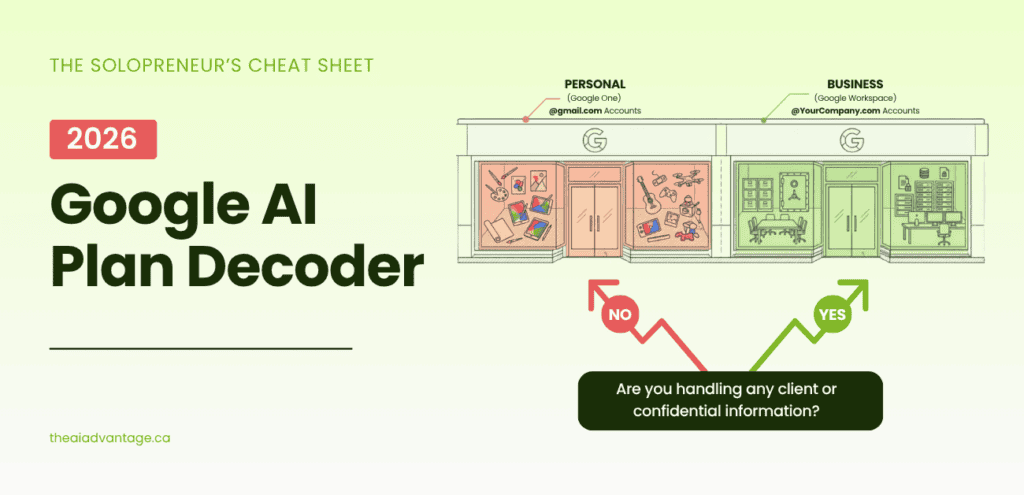
You went to buy one Google plan.
An hour later you had fourteen tabs open, three help articles that contradicted each other, and a headache.
I’ve watched a hundred smart business owners hit this exact wall. It’s not you. Google’s plans genuinely are a maze — and there’s one reason why.
Google runs two separate worlds
Here’s the thing nobody tells you.
Google AI plans don’t come in one lineup. They come in two — and they barely talk to each other.
Think of it like two stores with the same logo over the door. One is Personal (Google One). The other is Business (Google Workspace). Same brand. Totally different shelves.
A feature sitting proudly in one store might be missing from the other entirely. Not cheaper. Not smaller. Gone.
Once you see the two-store split, the confusion melts. So let me show you the whole thing on one page.
Meet the decoder
Field guide · updated July 2026
The Google AI Plan Decoder Why the same feature shows up on one plan and vanishes on the next
Google runs two separate universes: Personal plans (Google One) and Business plans (Workspace). A feature living in one doesn’t mean it lives in the other — and that’s where almost everyone gets lost. This chart puts both side by side so you can stop guessing.
Verified against Google’s own pages on July 20, 2026. Prices below are Google’s list rates in USD — see “The fine print that actually costs you” at the bottom for what that means in Canada.
Google One — AI plans
For an individual signed in with a personal @gmail.com account. This is the consumer side — where the flashy creative tools (Flow, higher limits, Spark) tend to land first.
| Feature | Free$0 | AI Plus$9.99/mo | AI Pro$19.99/mo | AI Ultrafrom ~$100/mo |
|---|---|---|---|---|
| Cloud storage | 15 GB | 400 GB | 5 TB | 20 TB+ |
| Data protectiontraining on your inputs | Setting only | Setting only | Setting only | Setting only |
| Gemini app usage limits | Basic | 2× | 4× | up to 20× |
| Most capable Pro model | Limited | More | Expanded | Highest |
| Deep Research | Limited | ✓ | ✓ | ✓ |
| Deep Think reasoning | — | — | — | ✓ |
| NotebookLM | Basic | More | Expanded | Higher |
| Saved Info / Memoryauto — but tied to training | ✓ | ✓ | ✓ | ✓ |
| Google Flow creditsvideo / image generation | 50 / day trial level |
200 / mo | 1,000 / mo | 10,000–25,000 / mo |
| Gemini Spark24/7 AI agent | — | — | Coming soon | ✓ rolling out |
| YouTube Premium | — | — | Lite | Full |
Google Workspace — plans
For a business signed in with a custom domain @yourcompany.com account. Stronger on collaboration and admin control — but Google deliberately walls off some consumer AI features here (see the memory row).
| Feature | Starter$7 · $8.40 flex | Standard$14 · $16.80 flex | Plus$22 · $26.40 flex | Enterprisecustom quote |
|---|---|---|---|---|
| Pooled storage / user | 30 GB | 2 TB | 5 TB | 5 TB+ |
| Data protectioncore apps · excludes Flow (Labs) | ✓ Contract | ✓ Contract | ✓ Contract | ✓ Contract |
| Gemini in Gmail | ✓ | ✓ | ✓ | ✓ |
| Gemini in Docs, Sheets, Slides, Drive, Meet, Chat | — | ✓ | ✓ | ✓ |
| Gemini app access | Basic | Expanded | Expanded | Expanded |
| Gemscustom AI experts | ✓ | ✓ | ✓ | ✓ |
| NotebookLMaudio overviews / day | Basic (3/day) | Expanded (20/day) | Expanded | Expanded |
| Memory & personalizationinstructions, Gems, NotebookLM | Gmail only | ✓ Built-in | ✓ Built-in | ✓ Built-in |
| Google Flow creditsvideo / image generation | 50 / day trial level |
50 / day trial level |
50 / day trial level |
50 / day trial level |
| Gemini Sparkconsumer AI Pro/Ultra only so far · business preview TBA | — | Preview TBA | Preview TBA | Preview TBA |
| AI Expanded Accessadd-on, sold separately | — not eligible |
Add-on | Add-on | Add-on |
What the AI Expanded Access add-on buys you (Business Standard/Plus & Enterprise Standard/Plus): higher image generation (Nano Banana Pro), video (Veo 3.1 in Vids), deeper Gemini reasoning, more NotebookLM, more Workspace Studio automations, and real-time speech translation. It no longer boosts Google Flow — Google removed Flow from this add-on on July 7, 2026. Only customers who bought it on an annual plan before May 5, 2026 keep the Flow boost until their renewal.
The part that isn’t on any pricing page: your data
This is the row that actually decides it. The moment you touch client or proprietary information, where your data lives matters more than any feature above. There are three levels of protection — and they don’t line up with price.
Core Workspace apps, paid business plan
Gemini in Gmail, Docs, Sheets, Slides, Drive, Meet + the Workspace Gemini app. Google is contractually bound not to train on your data (Cloud Data Processing Addendum). No human review without your consent. Ad-free. A contract — not a setting.
Any consumer plan · Free → Ultra
On a personal account, Google may use your chats to train its models and human reviewers sample some. You can switch it off — but it’s a toggle you can forget, and reviewed chats can sit on Google’s servers for up to 3 years, even after you delete them.
Google Flow — even on Business Standard
Flow is a Google Labs product with its own privacy notice. Prompts, uploads and generated videos are kept until you delete them, humans may sample them, and session history lives ~18 months. Your business contract doesn’t reach it.
The one rule
Client or proprietary data only goes where you have a contract — never a consumer plan, never a Labs tool. That single rule is why a paid Business Standard plan beats a flashier personal one for real client work.
The three things that trip everyone up
These are the exact mismatches that make Google’s plans feel broken. They’re not bugs — they’re deliberate lines Google drew between the personal and business worlds.
01 Google Flow
People assume paying for a business plan unlocks Flow. It doesn’t. Only the personal plans hand out real monthly credit budgets.
02 Memory
Getting Gemini to remember your tone, your business, the things you’re tired of re-explaining.
03 Gemini Spark
The 24/7 AI agent that runs tasks in the background — the headline feature from Google I/O 2026.
The fine print that actually costs you
- Everything is priced in USD — even in Canada. Your card gets converted to CAD at your bank’s rate, which usually adds ~2.5–3% on top.
- Tax is extra. GST / HST / PST is added at checkout based on your province — it’s not in the sticker price.
- Business has two price columns. The lower number is the annual commitment rate; the higher “flex” number is month-to-month. Annual is ~20% cheaper but locks your seat count until renewal — cancel early and you pay the balance.
- Workspace customers can’t buy a personal AI plan for the same account. The business route is the AI features built into Workspace, plus the AI Expanded Access add-on — not Google One.
Bookmark that. Screenshot it. Send it to the friend who keeps asking you which plan to get.
Now — the three spots where people get burned.
The three Google AI plan features that trip everyone up
1. Google Flow (the video and image tool)
People assume a paid business plan unlocks Flow. It doesn’t.
On the personal side, you get real monthly credit budgets that grow with your plan — from 200 credits a month up to 25,000.
On the business side? Every plan — even the mid-tier Standard — is stuck at the free trial level: 50 credits a day. That’s it.
And here’s the fresh gotcha: Google used to let you buy a business add-on to boost Flow. They quietly removed that on July 7, 2026. So even paying extra won’t get you there anymore.
Want to actually play with it? You can — Business Standard drops you into that free daily tier automatically. I walked through building an AI avatar in Flow here, including the privacy fine print you’ll want to read before you record your face.
2. Memory (getting Gemini to remember you)
This is what lets Gemini remember your tone, your business, the stuff you’re tired of re-explaining.
On a personal account, it’s automatic — “Saved Info” remembers you in the background, even on free. But there’s a catch: it only works while your Gemini activity is on — the same switch that lets Google train on your chats. Turn it off for privacy, and Gemini forgets everything. Every session from scratch. Here’s what happens when you shut it off.
On a business account, there’s no passive “Saved Info” toggle — and that’s what trips people up. But you’re not stuck with a goldfish. Business Standard remembers you on purpose, three ways:
- Custom instructions — up to 1,000 characters of “here’s how I work” that Gemini follows across Gmail and Docs. I walk through it in my Gmail guide — and it works the same in Docs.
- A Gem — a custom assistant trained on your voice, offers, and pricing.
- NotebookLM — a permanent knowledge base of who you are and what you’ve said.
And all of it stays private by contract. You just build it on purpose instead of letting it happen to you. Here’s my step-by-step guide to building it.
3. Gemini Spark (the 24/7 agent)
Spark is the shiny new one — an agent that runs tasks in the background while your laptop’s closed.
Personal AI Ultra has it now (rolling out, US first).
Business users get… a “coming soon.” No firm date. And Google’s already signalling it won’t work quite the same way.
What you’ll actually pay in Canada
One more trap, and this one’s just math.
Google prices everything in US dollars — even in Canada. So the number on the page isn’t the number on your card.
Your bank converts to Canadian dollars and usually tacks on about 2.5–3%. Then GST/HST/PST gets added at checkout on top of that.
And on business plans, watch the two price columns. The lower one is the annual rate — cheaper, but it locks your seat count until renewal. Cancel early and you pay out the balance.
None of that is a dealbreaker. It’s just the difference between a budget that holds and a surprise on your statement.
(Every price, credit, and date above was pulled straight from Google’s own plan pages and verified July 2026. Google reshuffles this stuff constantly — always reconfirm before you buy.)
The thing that actually decides it: your data
Here’s what none of those price columns tell you. And it’s the whole ballgame the moment you touch client work.
When you use Gemini inside a paid Business plan — in Gmail, Docs, Sheets — you’re covered by a contract. Google is legally bound not to train its models on your stuff. No human reviewer reads it. That’s the Cloud Data Processing Addendum, and it’s the reason I run my business on Business Standard.
A personal plan? No contract. Just a setting.
By default, Google can use your chats to train its models, and real humans sample some of them. You can switch that off — but it’s a toggle you can forget. And once a chat’s been reviewed, it can sit on Google’s servers for up to three years. Even after you hit delete.
Google Flow is its own animal. It’s a Labs product, so even on Business Standard it runs under separate rules — your uploads and videos stick around until you delete them. Fun sandbox. Not a vault.
I watch people paste client contracts into free AI accounts every single week. It feels efficient. It’s a fire waiting to happen — and here in Canada, with Bill C-36 on the way, it’s about to get expensive. I broke that down here.
The rule I give every client: client or proprietary data only goes where you have a contract. Never a personal plan. Never a Labs tool. No exceptions.
So which Google AI plan do you need?
Start with the data question, not the feature list.
Handling any client or confidential info? You want a paid Business plan — and for most solopreneurs, Business Standard is the sweet spot. The contract is the point. The custom domain is a bonus.
Truly personal use — grocery lists, trip planning, hobby videos? The personal side (Google One) is fine, and it’s where the fun creative toys live. Just keep business data out of it.
Most of the people I work with are trying to run a real business and use the good AI tools. That’s exactly where the two worlds collide — and where the wrong click costs you a year on the wrong plan, or worse, a client’s trust.