Stop Paying Twice. Google Workspace Business Standard Has Everything You Need.
If you run a solo business, your work has to live somewhere.
For most people, that means one of two places: Microsoft 365 or Google Workspace.
That’s home base. The central nervous system of your business. Your documents, your emails, your client work, your notes, your calendar. Everything.
But here’s where things can start to get messy.
Over the past year, a lot of solopreneurs have added AI tools on top of that. A subscription to ChatGPT. Maybe Claude. Sometimes more.
Each one promising to save time. Help you write. Think. Plan – And they do.
But now your “simple” setup looks like this: your work in one place, your AI in another, and a growing list of subscriptions tying it all together.
As I was purging the clutter in my new home, I took a hard look at my bank statement. I realized I was paying for a dozen ‘digital employees’ who weren’t even talking to each other. So, I fired them and moved back home to Google.
Why your best tool is the one you’ve already paid for
“AI FOMO” is real, but it’s a trap. It keeps you busy looking for the next best thing instead of focusing on the powerful system you already have.
Most solopreneurs don’t need more tools. They need a system that works together. One place where everything lives.
If you are a solopreneur on a Google Workspace Business Standard plan, you aren’t just paying for an email address and a place to store files. You’re sitting on the foundation of a high-performance AI Command Centre.
Your business needs a home, not a toolkit
Most solopreneurs I talk to are running some version of this:
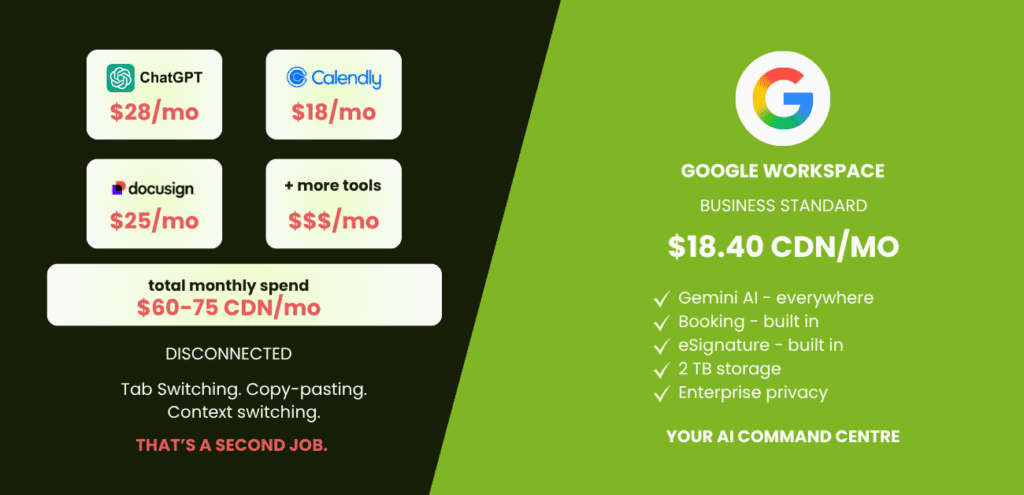
- A ChatGPT Plus subscription for AI help (~$28 CDN/month)
- Calendly for booking (~$18 CDN/month)
- DocuSign or DropBox Sign for contracts (~$20-25 CDN/month)
That’s $60-75 a month. And oftentimes more.
Individually, these tools are fine. Together, they’re disconnected. That gap is where your time goes. You’re copying and pasting between apps. Switching tabs. Losing context – and focus – every single time.
That’s not a tool stack. That’s a second job.
Google Workspace Business Standard at $18.40/month CDN replaces all three.
Not kind of. Not almost. Replaces them.
What You Get on Business Starter (And What You Don’t)
I’m about to get nerdy for a second, but it’s the kind of nerdiness that saves you $500 a year. Let’s look at the gap between Starter and Standard.
Business Starter ($9.20/month CDN) gives you the basics:
- A branded business email (yourname@yourbusiness.com)
- Gemini AI assistant – but only in Gmail
- Basic Gemini app access (limited models)
- 30GB storage
- Video meetings for up to 100 people
- Google Vids
The branded email alone is worth it. And if you’re just getting started with no client data to protect, Starter is a reasonable first step.
But Gemini on Starter only lives in Gmail. You don’t get the sidepanels in Docs, Meet, or Sheets. You don’t get Gems – the custom AI agents you build to work the way your business works. You don’t get expanded model access. No Workspace Studio.
So most people on Starter sign up for ChatGPT Plus to fill the gap. And now they’re paying for both.
As my daughter would say, “the math isn’t mathing”.
Your Business Lives Here. Why are you working everywhere else?
Think about your daily workflow. Your files are in Drive. Your conversations are in Gmail. Your schedule is in Calendar. This is your Productivity Hub. The backbone of your business.
When you go “outside” to a third-party AI wrapper or a separate subscription tool, you aren’t just spending money; you are breaking your flow. You are moving data from the place it lives to a place it is just visiting.
By learning the tools already built into your Standard plan, you gain Operational Momentum. You stop “tab-switching” and start operating from a single source of truth.
The ROI Winner: Why “Business Standard” is the sweet spot
This is where the magic happens because it’s where AI (Gemini) becomes an employee, not just a chatbot.
Upgrading to Business Standard isn’t just about getting more features. It changes how you operate.
Everything lives in one place. And your AI actually has access to it.
Most people think of AI like this:
“I go to ChatGPT when I need help.”
That’s not wrong, but it’s inefficient.
With Gemini inside Google Workspace, AI shows up where you’re already working.
What that looks like in practice:
Gemini in everything. Not just Gmail. Docs, Meet, Sheets, Drive. The sidepanels open up across your whole workspace. You can ask Gemini to summarize a proposal, draft a follow-up from a meeting, or pull information from a Drive folder — without leaving the app you’re already in.
You get Gems. These are your custom AI agents. Think of a Gem as a team member you’ve trained on your brand voice, your workflows, your client context. I have one for content. One for client emails. They don’t forget. They don’t complain. And they’re included in the plan. A Gem doesn’t just write; it writes like you because you’ve given it the keys to your ‘Jewellery Box’.
Appointment booking — built in. No more Calendly subscription. Your booking page lives inside Google Calendar. Syncs automatically. You can even connect Stripe if you want clients to pay when they book.
eSignature — built in. Send proposals and contracts directly from Google Docs. Clients sign digitally. It’s legally valid. No DocuSign account required.
Meeting recordings and AI notes. Every Google Meet can be recorded. Gemini takes notes and generates a transcript automatically. After the call, you have a summary and a list of action items — without writing a single word.
NotebookLM with expanded access. This is your AI research partner. Upload documents, link Drive files, drop in a YouTube URL. Ask it questions. Get answers sourced directly from your content. I use it to prep for client calls and to mine my own content for new ideas.
Workspace Studio — already included. Workspace Studio lets you build no-code automations that connect your Google apps. I built a flow that watches my inbox, reads every invoice, logs it to my expense tracker, and files the PDF to Drive. Automatically. I wrote the whole tutorial here.
2TB of storage. Up from 30GB. You won’t think about storage again.
Enterprise-grade data protection at a solopreneur price point
One of the biggest risks I see today is feeding client data or proprietary notes into free, public tools.
When I use Gemini for client work, I’m talking about real businesses. Real strategies. Real numbers. Sometimes I’m drafting proposals that reference confidential information. Sometimes I’m summarizing emails that were never meant to be public.
On a free Google account, your Gemini conversations will be used to train Google’s public AI models by default. You can turn that off – but when you do, Gemini loses its memory. Still on the free version of Google? Here’s what it’s costing you.
When you build your AI Command Centre on the Standard plan, you aren’t just getting Gemini; you’re getting an Enterprise-grade privacy shield. Your data is yours. And not fuel for Google’s public models.
You’re not just using AI. You’re using AI responsibly.
And that… is worth everything.
Own the Room, Not Just the Tools
Most solopreneurs are “renting” their productivity from a dozen different startups – but what they need is a home base.
If you’re on Business Standard, you’re not lacking features – you’re likely just scratching the surface of it’s capabilities.
The real upgrade isn’t another subscription. It’s turning your current setup into something intentional and connected.
It’s time to stop searching and start building.
If you’re ready to stop the subscription bleed and start building a real system, your AI Command Centre is waiting for you.
Try It Before You Decide
Google offers a 14-day free trial with full access, no credit card required upfront. Custom email, Gems, sidepanels, everything.