
You’ve been using Google for years.
Gmail. Drive. Docs. Maybe you’re on the free version of Gemini.
It works, it’s familiar – and free.
So why consider paying for something you’re already getting at no cost?
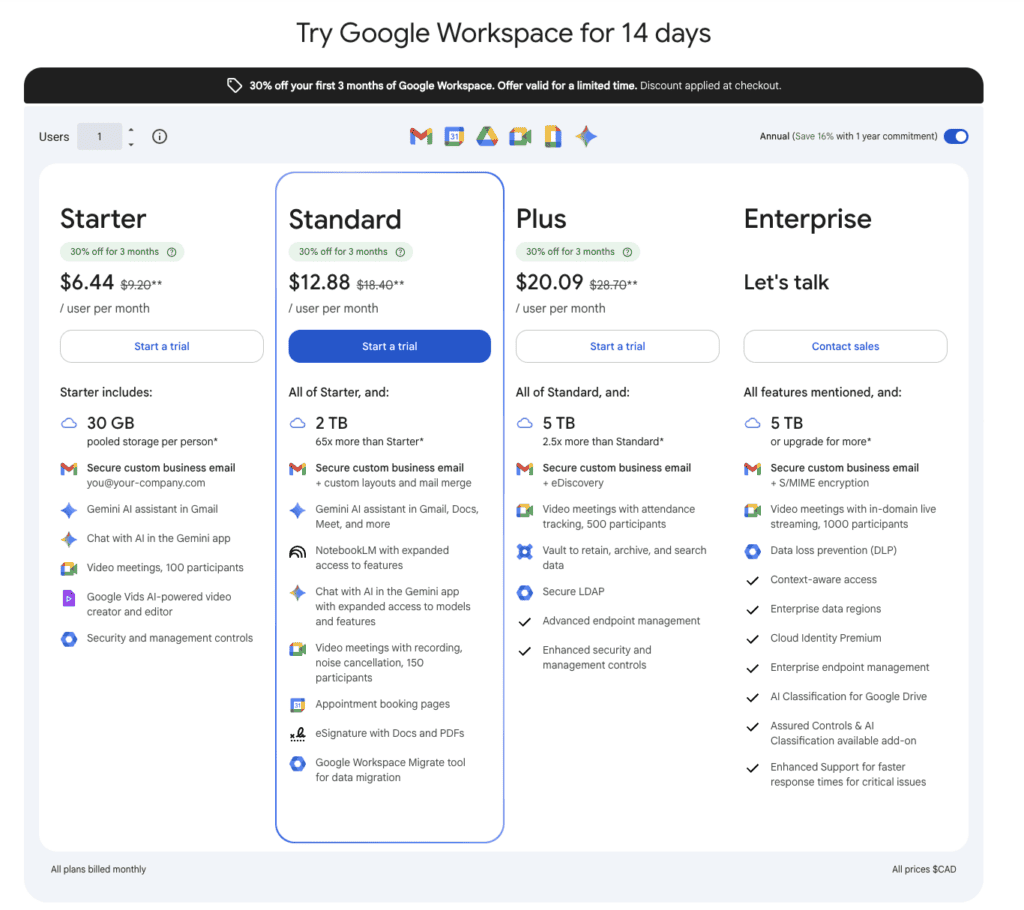
That’s what we’ll be talking about today. The features comparison chart is below – but this conversation is about what you’re agreeing to (and missing out on) when you use the free version of Google for your business.
Because there’s a difference. And once you know, you can’t unknow.
What’s Actually Happening When You Use Free Google Tools
When you use the free version of Gemini, your conversations are used to train Google’s AI models by default. Gmail and Drive work differently – your content powers smart features like autocomplete and spam filtering – but it’s not used for AI model training.
Every prompt you type into Gemini is connected to your Google account, your identity and history – creating a digital footprint.
It’s not a reason to panic, but it is worth knowing.
You Can Turn It Off. But There’s A Catch.
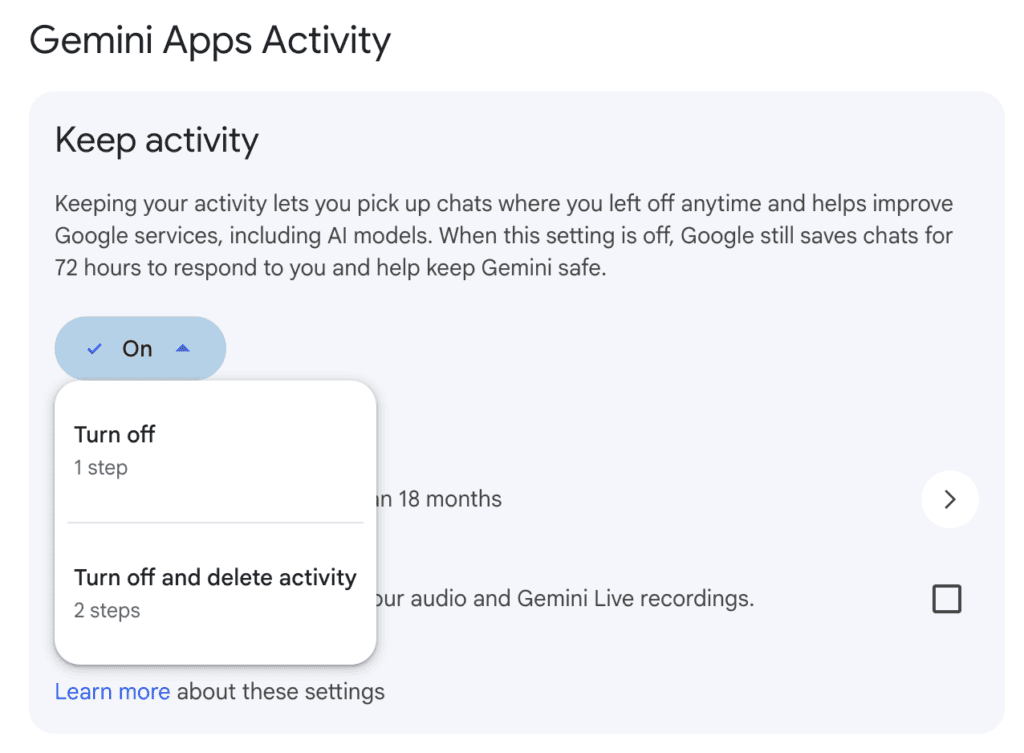
Google does give you a way out. You can turn off Gemini Apps Activity — with just 3 clicks.
On mobile: Profile icon → Gemini Apps Activity → Turn off
In your browser: Menu → Settings and help → Activity → Turn off
But here’s what happens when you do.
Gemini loses its memory. Your conversation history disappears. Every session starts from scratch. And your chats are deleted after 72 hours.
So you’re choosing between two things:
- Leave it on — Gemini saves your conversation history so you have continuity between sessions. Your data may also be used to train Google’s AI models and reviewed by human reviewers.
- Turn it off — Your data stays more private. But Gemini loses its memory. Every session starts from scratch.
The Middle Ground: Temporary Chat
If you’re not ready to commit either way, there’s a third option. Or – toggle between the two.
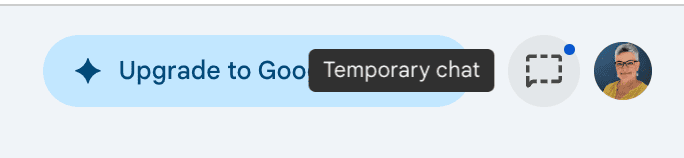
Temporary Chat lets you have private conversations with Gemini that disappear after 72 hours and isn’t used for training. You still lose continuity between sessions. But it’s a good option for sensitive conversations. Look for the dotted chat icon in the upper right hand corner of your screen next to your profile picture.
When you upgrade to a paid Google Workspace account, the rules change.
Here are your options.
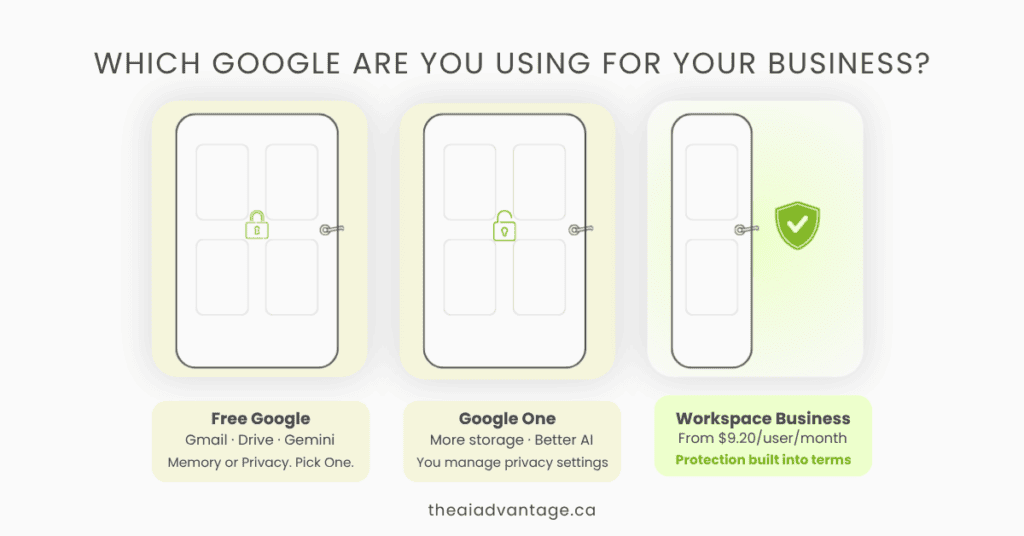
Free Google Account What most people start with. Gmail, Drive, Docs, Gemini — all included. Limited storage. And by default, your activity can be used to train Google’s AI models. You can opt out, but you lose conversation history when you do.
Google One (AI Plus, Pro or Ultra — from $6.99 to $279.99/month CDN) This is the upgrade path for personal users. You get more storage, access to a stronger Gemini model, and Gemini built into your Google apps. It’s a big step up.
But here’s what you need to know: Google One is still a consumer product. You don’t get a custom branded email ie: yourname@yourbusiness.com. And the data protections are not automatic the way they are on a business account – you need to configure them.
Google Workspace Business (starting at $9.20/month) This is where the rules fundamentally change. Workspace does not use customer data for training models by default. It’s baked into the terms and not a setting you have to find and turn on.
In practice this means you can: have a real conversation with Gemini about a client, link directly to their files, ask it to summarize a proposal, draft a follow-up email, or pull information from across your Drive. With extensions turned on, Gemini is the central nervous system for your business and knows your entire back office – your emails, your documents, your calendar – and your data stays inside your business environment. None of it becomes training data or is reviewed by humans without your permission.
You also get a custom branded email — yourname@yourbusiness.com — which Google One doesn’t include.
Here’s What I Pay For:
I’m on the Business Standard plan at $18.40/month CDN (p/user) .
I love my branded email — nancy@theaiadvantage.ca is far more professional than a @gmail.com address, but I pay for the security, not the branding.
I sleep better knowing that content is protected. And at $18.40/month, it’s the cheapest line item in my business that protects my reputation.
Which Plan Is Right for You?
Here’s a simple way to think about it.
Stick with the free version if:
- You’re in the early stages with no client data to protect
- You’re comfortable using Temporary Chat for sensitive conversations
- You’re primarily using Google for personal productivity
Consider Google One if:
- You want a stronger Gemini model for personal use
- More storage is your main pain point
- You don’t have client data to protect and aren’t ready for a business account
Upgrade to Business Starter ($9.20/month) if:
- You want a professional branded email and automatic data protection. Gemini is available in Gmail, but not in your other apps.
Upgrade to Business Standard ($18.40/month) if:
- You want Gemini working across all your Workspace Apps: Gmail, Docs, Meet, Sheets and more. Gemini lives in the side panel – summarizing emails, drafting documents, taking meeting notes. You also get 2TB of storage, eSignature, and appointment booking built in. For most solopreneurs doing real client work, this is the plan that offers the best ROI. Avoid the subscription trap and find out why Google Workspace Business Standard has everything you need.
Still not sure which plan fits?
Book a free discovery call. Tell me what you’re using and what’s getting in the way. I’ll tell you what I’d do.
Book your free call →
The Bottom Line
The free version of Google is a great starting point. I have one to test new features. FYI: New features are slower to roll out to the Business plans – they test them first on the free plans. But I don’t recommend the free plan for confidential client work.
The moment someone else’s information lives in your inbox or your Drive, you owe it to them – and yourself – to know exactly where that data is going.
Informed beats free. Every time.
Not sure which plan fits? Book a free discovery call and we’ll sort it out together. Already decided? The 14-day free trial gives you full access before you spend a dollar.