
There are parts of running a business that nobody warns you about.
Not the hard work. You knew about that. Not the long hours. You signed up for those.
I’m talking about the rooms you’d open the door to, take one look inside, and quietly close it again. You’d tell yourself you’d deal with it later. Later kept moving.
You know the ones.
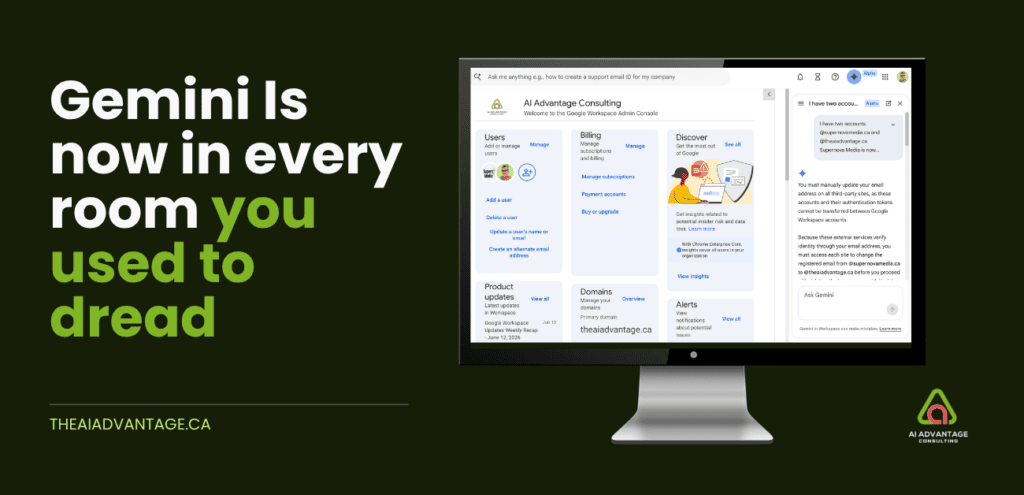
The Google Admin Console. A dashboard that looked like it was designed for an IT department — not one person wearing every hat. Numbers. Toggles. Settings you were afraid to touch in case you broke something.
Google Analytics. Graphs without colour. Metrics without context. Numbers on a page that told you something was happening — but not what to do about it.
Your Google Business Profile. You set it up once. Probably two years ago. Maybe longer. You’ve added new services since then. You’ve changed your hours. But that page? Still showing the old version of you.
Here’s what changed.
Gemini in the Google Admin Console — and across your Analytics, your Business Profile, and your Business Notebooks — means you don’t have to walk into those rooms alone anymore.
The Question That Saved Me $18.40 a Month
Let me tell you about the first question I ever asked Gemini in the Admin Console.
A bit of backstory. I ran Supernova Media for 17 years — my second company. When I launched AI Advantage Consulting in December 2024, I added it as a new account in my Google Workspace panel. Two companies. Two subscriptions. Running side by side.
And then life happened. Client work. Content. The thousand small fires that make up a solopreneur Tuesday. The Supernova account sat there, very quietly charging me every month, because dealing with it felt too big. Twenty years of data lived in that account. Every email address I’d ever signed up with, every third-party tool, every contact, every calendar — all of it anchored to @supernovamedia.ca.
I knew I needed to consolidate. I didn’t know where to start. And I definitely didn’t have the mental bandwidth to figure it out alone.
Then Gemini showed up in the Admin Console side panel.
There are two ways to talk to Gemini here. The search bar running across the top of the console lets you ask quick questions without leaving the page. The side panel — the diamond icon in the top right — opens a full conversation where Gemini holds context and builds on your previous answers. That’s where I asked my first question.
My first question: “I have two Workspace accounts. How do I consolidate them without losing data?”
What happened next was not a help article. It was not a chatbot sending me to a forum. It was a step-by-step plan, specific to my accounts and my situation, that walked me through:
- Updating every external site that used my @supernovamedia.ca credentials
- Transferring Drive file ownership to my new account
- Exporting emails, contacts, and calendars safely
- Setting up forwarding so nothing slipped through
- Watching my old inbox for four months to catch stragglers
- Deleting the legacy account only when everything was confirmed safe
It even flagged the things that could go wrong. Twenty years of data. Not one thing lost.
Cost of that conversation: zero.
Money saved per month: $18.40.
Why Gemini in the Google Admin Console Changes Everything
Ever tried to get support from Google?
If you know, you know.
That’s not a dig. It’s just reality. Google is a massive company. Getting a human being on the phone to answer a question about your specific account, your specific data, your specific situation — that’s not how it works.
Until now, the Admin Console was a place most solopreneurs either avoided entirely or tiptoed through, praying they didn’t accidentally turn something off. And even if you were brave enough to go in — what then? You’d have to screenshot it, download a report, upload it somewhere else, and then ask your question.
That workaround is gone.
Gemini has been in the Admin Console side panel since September 2025. It knows your account. It knows your data. You can ask it anything — about your users, your subscriptions, your security settings, your storage — and get an answer that’s specific to you.
Not a generic tutorial. Not a help article written for a company with 500 employees.
Your account. Your answer. Right now.
The Other Rooms Just Got Easier Too
Google Analytics: Ask Advisor
Before May 2026, here’s what I did when I wanted to understand my analytics.
I downloaded the data. Or took screenshots. Then I uploaded them to a custom Gem I’d built — just so I could ask questions about my own numbers.
That was the workaround. And it worked. But it was a workaround.
Ask Advisor is now built directly into Google Analytics. It lives in the side panel. Click the magnifying glass with the sparkle icon in the navigation bar at the top. You open Analytics, you see your data, and you ask questions in plain English. What’s driving traffic this month? Which posts are getting the most clicks? What changed in the last 30 days?
No download. No screenshot. No tab-switching.
Your data. Your questions. One place.
Your Google Business Profile: Finally Getting the Help It Deserves
Here’s something I want you to think about for a second.
Your Google Business Profile is your digital storefront. It’s what shows up when someone Googles your name. It’s where potential clients decide — in about eight seconds — whether to keep reading or move on.
And most of us haven’t touched it in months.
Not because we don’t care. Because it’s another thing. Another tab. Another platform. Another task that lives on the list but never quite makes it to the top.
Google is now rolling out a direct connection between your Business Profile and Gemini. Once connected, you can:
- Ask Gemini how your business performed this month — and it pulls your actual search impressions, call data, direction requests, and customer engagement
- Ask it to draft a response to your latest review, in your voice, referencing the specific feedback the customer left
- Update your hours, post seasonal announcements, or fill in profile gaps — without opening a single new tab
I haven’t had this land in my account yet. But I already know exactly how I’m going to use it.
Once a month. One Gemini conversation. Business profile reviewed, updated, and responded to.
Set that as a task. Add it to your calendar. Make it a ritual.
Because the clients who find you through Google Search deserve to see the version of you that exists right now — not the one from eighteen months ago.
Note: Business Notebooks and the Google Business Profile integration require a Google Workspace Business account. If you’re still on a free Google account — or wondering whether it’s time to upgrade — here’s what that decision actually looks like for solopreneurs.
Business Notebooks: The Tab Problem, Finally Solved
Picture this…
Right now, on any given working day, I have open:
- A Gem trained on every plugin installed on my WordPress site
- A Claude Project — where I draft blog posts and manage my MailerLite campaigns
- Search Console
- Google Analytics
- My Google Business Profile
- NotebookLM — my business brain, trained on every page of my site, my core offers, my SOPs, my FAQs
And I know I’ve missed at least three tabs just typing that.
Here’s the thing about a perfect system. It only works when you can stay in it. And no solopreneur stays in anything uninterrupted. The phone rings. A client emails. The dog needs out. You come back and you’ve lost the thread.
Every single time you don’t have to open a tab or remember a step — that’s a win. A big one. Because for most people it takes around 20–25 minutes to fully regain focus after a distraction — especially on complex work like the above.
Business Notebooks in Gemini are built around exactly this problem. A centralized hub where your Google Business Profile, your website, your workflows, and your business context all live together. Gemini references all of it. And you pick up where you left off.
It proactively surfaces what needs your attention. Unanswered customer questions. Holiday hours not set yet. Opportunities you might have missed.
It’s the difference between a system that waits for you to remember — and one that remembers for you.
I’m already building how I’ll integrate this into my workflow. Because that’s what you do when you’re in the right ecosystem. You don’t wait for the feature. You’re already thinking three steps ahead.
If you want to understand why this matters — why having everything inside one ecosystem changes the game — this post on the Ferrari principle explains exactly what I mean.
What to Do Right Now
You don’t have to wait for Business Notebooks to roll out. You can start today.
1. Open your Google Business Profile. Go to business.google.com and actually look at it. When did you last update it? Are your services current? Your hours? Your photos?
Note every gap. Write it down. That list is your first Gemini conversation when the integration arrives.
2. Open Google Analytics and look for Ask Advisor. It’s in the side panel — the magnifying glass with the sparkle icon. If you have it, use it. Ask one question: “What was my top traffic source this month?” Just start there.
3. Log into your Admin Console. Go to admin.google.com. Open the Gemini side panel. Ask one question about your account. Anything you’ve been wondering. Subscriptions. Storage. Security.
See what happens.
You’ve been running this business largely alone. Making decisions with incomplete information. Avoiding the rooms that felt too technical, too complex, too much.
Gemini is now in those rooms.
Not as a replacement for your judgment. As the expert standing at your right hand — one who knows your account, your data, your business — and is ready the moment you have a question.
It’s a whole new way of working.
Sources: Google — Save time and grow your business with new Gemini tools (June 10, 2026)