
For two and a half days, I barely saw the light of day. Hubby handed me snacks and backed away slowly. I had a script that worked, but the document made my eyes bleed.
Hyperfocus is how I managed 17 years of my first and most deadline-driven business. It worked, until it didn’t, and I burned out twice. I have ADHD. I was building a tool for people with ADHD.
The irony wasn’t lost on me. I kept going anyway.
What saved me during those two and a half days was my own system running in the background. Every time my brain wandered off mid-build, and it wandered a lot… I said it out loud to my phone. Thirty seconds later it was categorized, prioritized, with an agent offering the smallest-next-step. Because I didn’t have the bandwidth to remember. Or to make decisions.
That system is what I’m currently building out. For others. And as you’ll learn below, I turn things inside out and backwards before I’m willing to put my name on it and hand it to someone else.
What I Was Building
The actual tool is called the Admin Overwhelm Audit. It’s the front door to a new product I built for myself – because I needed it. Because every productivity tool I tried asks me to do three things at the exact moment I have zero capacity for them. Stay tuned. I’ll be launching the ADHD Admin OS to other people whose brains works like mine, soon.
Here’s the flow: someone fills out a short form — six questions you can answer by talking to your phone. Gemini reads the answers and scores four “admin lanes”. The same four lanes the full system runs on. They get a branded report back with one small, specific move to make this week. I get notified with the diagnosis, summarized, so I know exactly who’s struggling and with what – so I can action it right away.
If you don’t know me, you might not have noticed that the report came back looking like plain text with no branding. It still would have done its job. But this is the first thing a stranger sees from a system built specifically for brains like mine. And if you know me, you know: ‘looks like an afterthought’ is not how I do things. My carpet lines are perfectly parallel. The clothes on the clothesline are equidistant, and sorted according to size.
TLDR
I built a fully automated intake system inside Google Workspace, as the lead magnet for a new product: someone fills out a form, Gemini scores their admin overwhelm across four lanes, and a branded report, two draft emails, and a follow-up task get created automatically — all without leaving Workspace or adding a new subscription. Getting the report branded took four dead ends — including one gated behind a feature Google hasn’t rolled out to my account tier yet — before the fix. The Workspace Studio flow, the Admin setup checklist, and the lessons below will save you the two days it took me to find them.
The Workspace Studio Flow
Here’s the flow, step by step:
- Trigger — a form response comes in
- Extract — pulls the raw answers into structured fields
- Ask Gemini — scores the four lanes and drafts the diagnosis
- Create a doc — this step calls the standalone Apps Script (more on why below)
- Summarize — condenses the diagnosis into a short internal recap
- Notify me by email — sends me the summary
- Draft an email — creates the prospect-facing email as a draft, never auto-sent
- Notify me in Chat — pings me in Google Chat
- Create a task — adds a same-day follow-up task
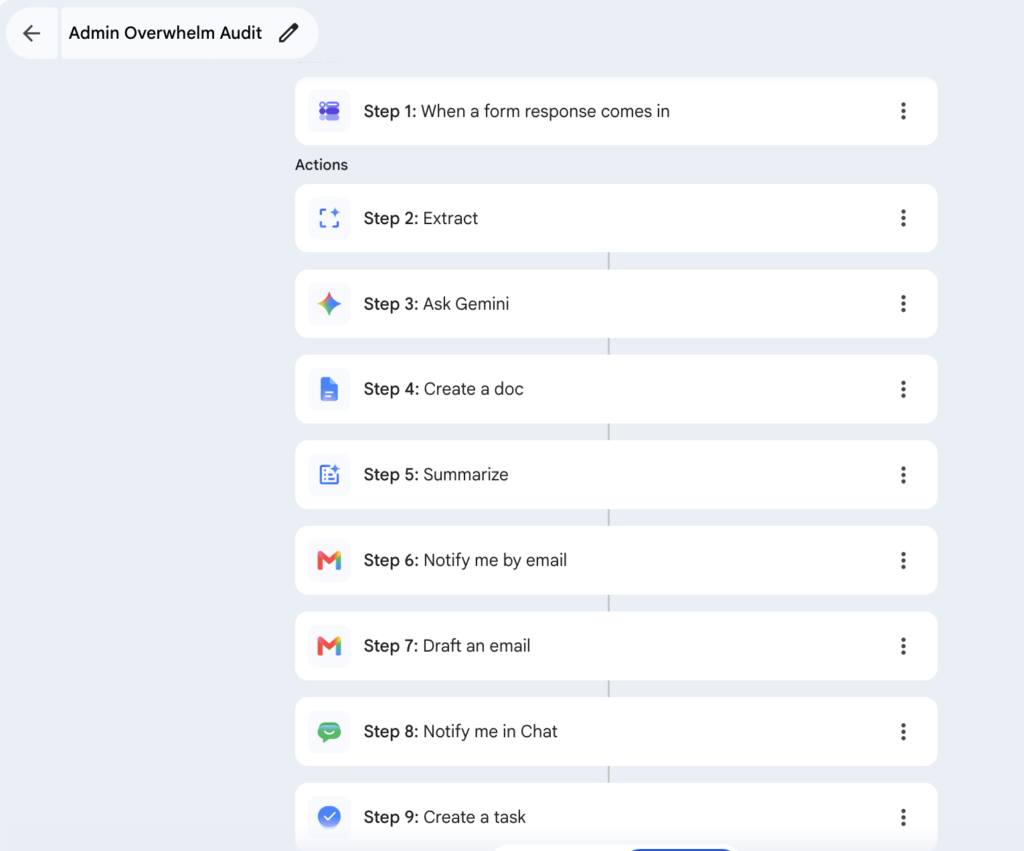
Step 4 is where I went down the rabbit hole. And spoiler alert – after one full day troubleshooting trying to recreate “match doc format,” I turned the flow off in favor of a more robust Apps Script managing the whole thing – successfully.
This is not my preference. I am determined to see this managed in Workspace Studio, where Step 4 calls a script whose sole job is to “match doc format.”
Why? Because if it breaks down, I can easily see which step, and it’s a workflow and interface that most Google Workspace users (not developers) would be far more comfortable replicating and using.
Side note: If you haven’t tried Workspace Studio, it’s included in your business standard plan. Here’s a workflow you can easily replicate to put track your expenses and put your inbox on autopilot.
Why Step 4 Kept Failing in Workspace Studio
Four different paths, four dead ends, before I said “uncle” and built the whole thing in Apps Script.
Attempt one was the one that should have worked. Google Docs has a feature called “Match doc format” inside a regular Doc, and I love it. I asked Gemini to use it in a prompt, inside the Ask Gemini step, expecting the same result. No-go. No matter how many times I rewrote the same prompt.
That’s the part the bugged me. “Match doc format” isn’t broken. It works great in Docs. Gemini just doesn’t carry that same understanding into a step inside a flow. And for me, that inconsistency feels awkward.
Attempt two was “Create with Gemini,” a different step type built specifically for generating files. Same result: content was fine, formatting never survived. Side note: You can’t “call” a Skill using “Create with Gemini”.
Attempt three I created and called a Skill for scoring the rubric, instead of writing the rules directly into the prompt. And though Skills are genuinely useful — for this specific job, referencing the Skill performed worse than writing the same rules directly into the prompt. It ignored the closed-set status labels and the numbered-steps formatting rule, while the fully inlined version got both right.
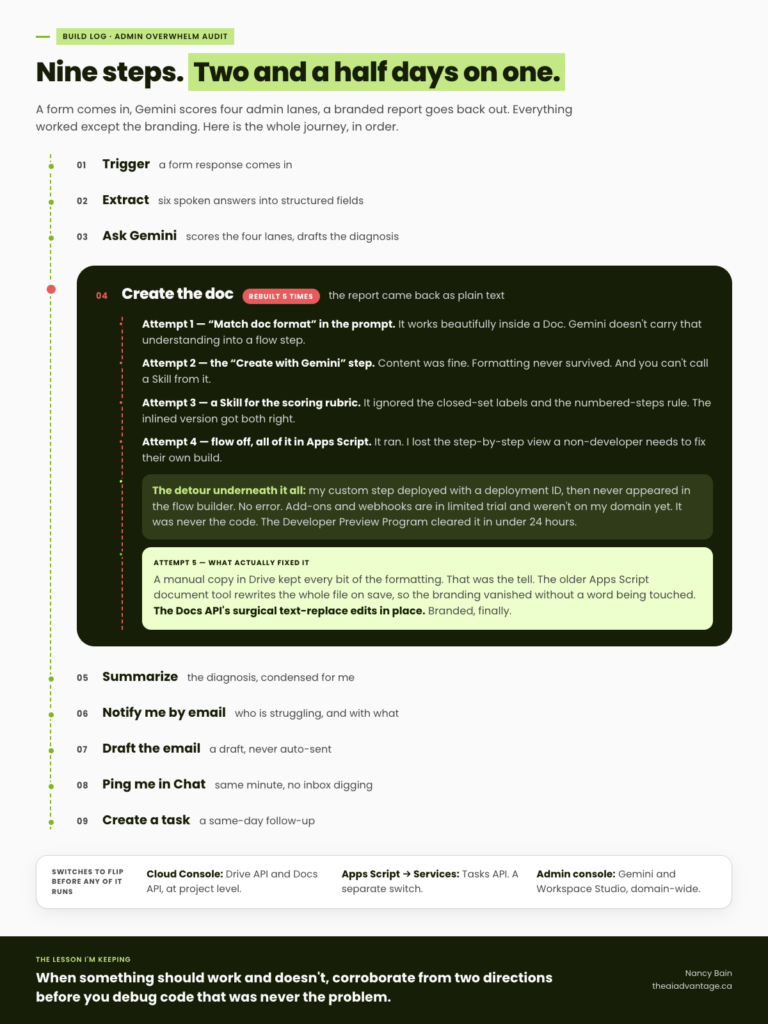
Lesson: don’t assume a feature that works natively in one Google Workspace product carries the same behavior into a step flow, even when Gemini is driving both. And Skills are strong for repeatable judgment calls — for a rubric that has to be followed exactly, with zero deviation, write the rule directly into the prompt instead of pointing at a Skill.
It wasn’t my time
I built the whole thing properly. A manifest file declaring my step’s inputs and outputs. Two functions: one to build the little config card you’d see when you add the step to a flow, one to actually run the logic. I deployed it. Apps Script told me it was installed. Deployment ID and everything.
I went back to Workspace Studio, hit “Add step,” and looked for it.
Nothing. Nada. Zip. Zero.
Not an error or warning. Just… not there. Which is almost worse than an error. Because an error at least tells you where to look. This told me nothing.
So I did what you do: assumed it was me. Checked the manifest character by character. Checked that my function names matched exactly between the manifest and the code. Refreshed the page about six times, like that was going to fix anything. Re-authorized the add-on in case a permission got dropped somewhere. Triple checked my Admin Console settings/permissions.
Still nothing.
Because the real problem? I’m just ahead of my time. Add-ons including calling an Apps Script and web-hooks are currently in limited trial and not yet rolled out to my domain.
This is where I reached out to the Google Workspace Developer Preview Program team to green-light my access to webhooks and add-ons (currently in limited trial) in Workspace Studio.
I was granted access in less than 24 hours. But it can take up to 48 behind the scenes. Then I’ll go back to the Workspace Studio flow, and reconfigure step 4 for the 5th time using “add-ons” and the simplified script.
Lesson: when something looks like it should work and doesn’t, don’t assume it’s your build. Corroborate from at least two independent directions before you spend another hour debugging code that was never the problem.
Where it stands right now: As of writing this, the custom step still hasn’t shown up. Yes – I check. Every. five. minutes.
What Actually Fixed the Branding
A plain “make a copy” through the Drive interface preserved every bit of formatting. The moment Apps Script’s older document tool opened that same copy and saved it, the branding vanished — even though no formatted text was touched. Switching to the Docs API’s surgical text-replace method, instead of the tool that rewrites the whole file on save, fixed it completely – and finally.
Lesson: if a script-driven process breaks something that a manual version doesn’t, test the manual version first. It isolates the problem in one step instead of hours of guessing at prompts.
What Has to Be Enabled Before Any of This Runs
This is the part that cost me the most confused hours, because none of these errors say what’s actually wrong.
- Google Cloud Console (console.cloud.google.com) — the Drive API and Docs API need to be manually enabled at the project level. On a managed Workspace account, Apps Script can’t auto-enable these the way it might on a personal account.
- Apps Script editor → Services panel — the Tasks API needs to be added here separately, as an Advanced Service. This is not the same action as enabling it in Cloud Console. Miss the Cloud Console step and you get a permission error. Miss the Services panel step and you get a completely different error that looks like a coding mistake.
- Google Admin console → Generative AI & Workspace Studio settings — the domain administrator has to turn on Gemini access before any of this works at all. If that’s off, nothing downstream matters. This is a whole other rabbit hole. If you need help with this (I saved the roadmap) reach out to me directly.
Worth mentioning: Gemini now lives in the side panel of your Admin Console and Apps Script. But – it’s domain specific. Don’t bother ask why custom steps aren’t showing up in Workspace Studio.
Common Mistakes to Skip
- Assuming a Skill will outperform writing the rule directly into your prompt. Test it before you trust it, especially for anything that has to be exact.
- Assuming your script “should” work just because it deployed successfully. Check whether the feature itself is even available on your account tier first.
- Assuming enabling something once covers every place it needs permission. Cloud Console and the Apps Script Services panel are two separate switches.
FAQ
Do I need to know how to code to build something like this? Some of it, yes — the branded-doc step needs actual Apps Script code. But you can build and test the diagnosis logic inside Workspace Studio’s no-code flow builder first. If you get stuck writing the script itself, the Gemini side panel inside the Apps Script editor will help you write and debug it — just know it can’t troubleshoot the Workspace Studio side of things, only the code.
Why did my document lose its formatting after Apps Script edited it? Older Apps Script document tools rewrite the whole file when they save, which can silently break formatting on documents that started life as a Word file. The Docs API’s surgical text-replace approach avoids this.
What’s the difference between writing a rule into my prompt and using a Skill? A Skill is a saved, reusable instruction set Gemini can reference across multiple steps or flows — useful for judgment calls you don’t want to re-explain every time. But for a rule that has to be followed exactly with no deviation, writing it directly into the prompt currently performs more reliably.
Why can’t Gemini in my Admin console tell me why my Workspace Studio flow broke? Because it’s not the same Gemini. The Admin console version controls access settings. The Apps Script side panel helps with code. Neither one sees inside a Workspace Studio flow’s own logic.
Is this worth building myself, or should I have just used Zapier or Make? If speed is the goal, Zapier or Make will get you there faster. If the goal is keeping everything inside the subscription you already pay for, and actually understanding how it works, this is the slower, sturdier way.
Quick Win Summary
I could have built this entire workflow before lunch with Zapier the fast way. The slow way took two and a half days, a hyperfocus spiral I recognized while I was inside it, but taught me things I’ll use in every automation I build moving forward. All inside the Google Workspace subscription I’m already paying for. It’s also the front door to the thing I built this whole system to lead people to: ADHD Admin OS. Removed decisions, and a system that tells you what’s next instead of asking you to figure it out. I’m still working on it. Stay tuned.
Curious what your four lanes look like? Take the Admin Overwhelm Audit.