You can’t be online 24/7, and your best advice is buried in 100+ blog posts, PDFs, and internal SOPs.
Thousands of hours of knowledge living inside your head.
And every week the same five questions land in your inbox.
“What do your programs cost?” “Do you offer 1:1 support?” “Where should I start?”
You are the expert. And you’re also the bottleneck.
It’s not a knowledge problem – it’s a delivery problem. Your expertise lives in you, and you can only be in one place at a time.
But what if it didn’t have to?
Part I: The Problem — You Are the Bottleneck
As a solopreneur, you are the only one who can answer the high-level questions. Every pricing inquiry, every “is this right for me?” message, every discovery question that arrives at 9 PM on a Friday lands on you.
I have 50+ public blog posts on this site. Years of content. A Gmail Challenge. My programs. And leads were still asking me the same questions that I’d already answered dozens of times on my site.
Not because they weren’t looking – or the information was hard to find – but because expertise locked inside my website isn’t the same as expertise that can respond.
The solution wasn’t a simple chatbot that answers questions. What I built is different. Instead of a static FAQ, I built a Semantic Search Engine and Sales Agent.
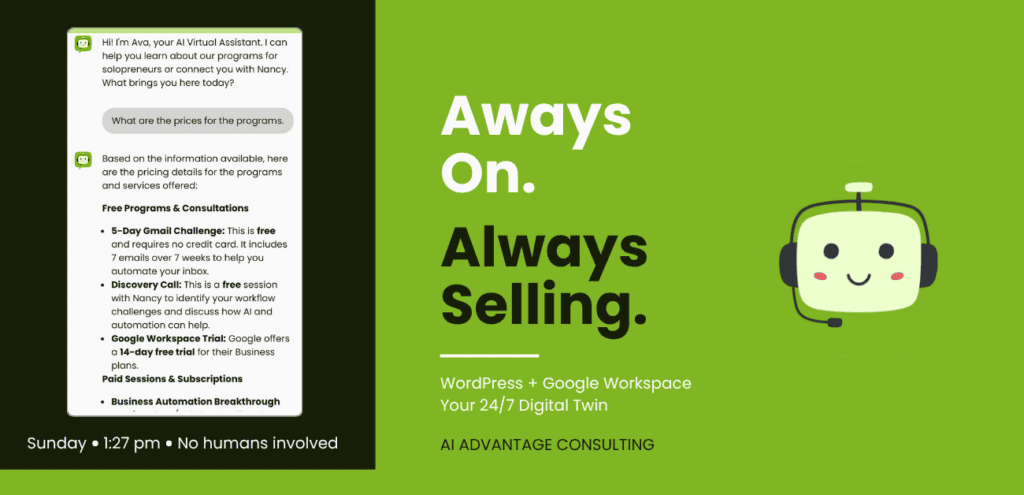
An instant staff member and Persistent Digital Brain that knows my programs, my tone of voice, and every tip I’ve ever published. It’s a 10x timesaver for lead qualification and customer support and pings me the moment a hot lead shows up.
I spent a weekend building it. Her name is Ava.
Strategy First
Strategy comes first. Always.
Determine Your Goals: Before deciding on a single tool or touching a setting, define what “Success” looks like.
- Lead Gen: Is Ava pitching your lead magnet?
- Support: Is she answering “How-to” questions?
- Consultant: Is she acting as a 24/7 version of you?
My sales hat has never fit right. I’ve left a lot of money on the table and missed opportunities over the years.
What success looked like for me: I wanted a full-time Sales Agent. Leads pre-qualified and pointed toward the Gmail Challenge or a Breakthrough Session. And I wanted an instant Gemini summary the moment someone signals buying intent.
I began by brainstorming in Docs with Gemini in the side panel with full access to my programs, my customers, my 25+ years of business history.
Part II: Step 1 — Building the Brain – the benefits of RAG (Retrieval-Augmented Generation) vs. standard fine-tuning
I didn’t ‘program’ Ava to know my prices. I just gave her access to my Google Drive.
While a fine-tuned model “remembers” things (like a student cramming for a test), Ava operates like an expert with an open book. Because I have her synced to my Google Docs and blogs she doesn’t have to “guess” my prices – she’s looking them up in real-time.
The benefits:
- Zero Hallucinations: By setting the temperature to 0.1, I told Ava, “If it’s not in the notes, don’t make it up.”
- The “Context Window“: Using Gemini 3 Flash allows her to read massive amounts of my content to find that one mention of an $18.40 Workspace fee buried in an old post.
- Live Links: Because she’s pulling from my actual site data, she’s serving up my theaiadvantage.ca/gmail-challenge link exactly when the lead is most likely to click it.
Here’s why that matters. When your knowledge base lives in Google Docs, you can update it, refine it, and expand it any time – without touching a single plugin setting. And because it’s in your Drive, your Business Standard Gemini can help you get the language right – before a lead ever sees it.
Structure is Queen:
AI doesn’t “read” a PDF; it “chunks” it. To get the best answers, you need to format your uploads properly. Don’t just dump information. Structure it. Gemini works best when you’ve cleaned your house before inviting it in. The cleaner your Docs, the more accurate your bot.
- Hierarchy Matters: Use clear headings (H1, H2). Don’t just use bold text; use actual document structure.
- Avoid “Fluff”: AI loves “Question: Answer” or “Action: Result” formats.
- Text is King: If your PDF is just one big image (like a flattened flyer), the AI is blind. Ensure the text is highlightable/selectable.
- Consistency: Use the same terms throughout. Don’t call it “The Program” in one place and “The Masterclass” in another.
Use Gemini in the sidebar to refine your language. Make sure it sounds like you – your voice, your way of explaining things, before any of it goes near the bot.
Building a knowledge base isn’t a one-time event. It’s an evolving asset. Every time you write a new post or record a new training, it gets fed to your digital twin.
Example Data: What to Upload
| Data Type | Purpose | Best Format |
| Lead Magnet PDF | Pitching to new visitors | Single-page high-impact summary |
| Pricing Guide | Pre-qualifying leads | Clear Table / List format |
| Blog Transcripts | Deep subject-matter expertise | Raw text / Markdown |
| Bio & Values | Humanizing the bot | First-person “I believe…” text |
Part III: Step 2 — The Silent Saleswoman (WordPress + Gemini Flash)
This is where the brain gets a voice.
I used the AI Engine Pro WordPress plugin to power Ava on my site connected to Gemini 3 Flash. In Google AI Studio I set up my API key, configured a monthly spend cap, and turned on billing alerts. Ava costs me under $10 a month to run.
For accuracy, I added Pinecone – a free vector database – as the retrieval layer. This is what keeps Ava grounded in my content instead of generating answers from thin air. When someone asks a question, she searches the knowledge base first. Then she answers.
The result is a bot that isn’t guessing. She’s retrieving.
But here’s what separates Ava from a generic chatbot. She isn’t just there to answer questions. She has a job.
Ava is programmed to:
Prequalify. She asks the right questions. What kind of business do you run? What’s your biggest challenge right now? She gathers context before she starts suggesting solutions — the way a good consultant does.
Promote. She leads the right visitors toward my free 5-Day Gmail Challenge. Low barrier. High value. The first step into my ecosystem.
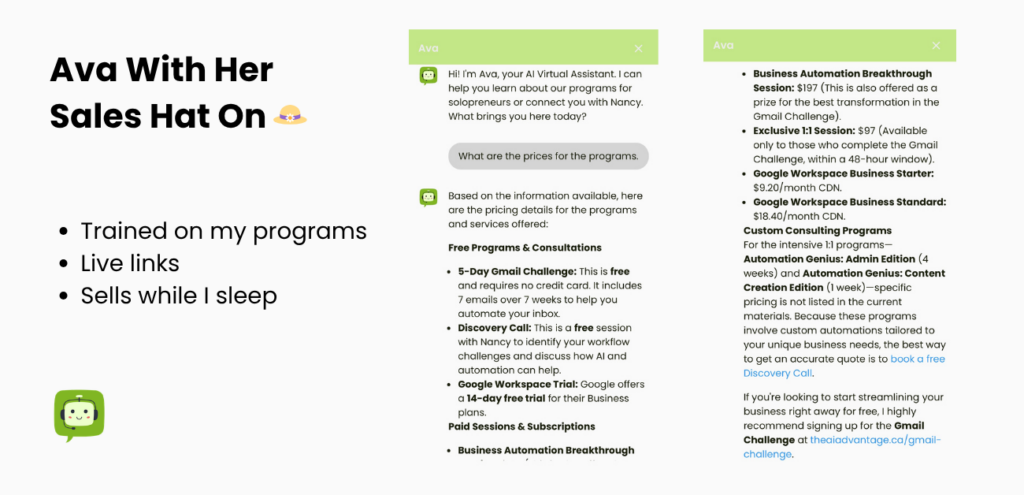
Upsell — at the right moment. When the conversation signals someone is ready for more, Ava doesn’t hesitate. She mentions the $197 Business Automation Breakthrough Session and links directly to the booking page.
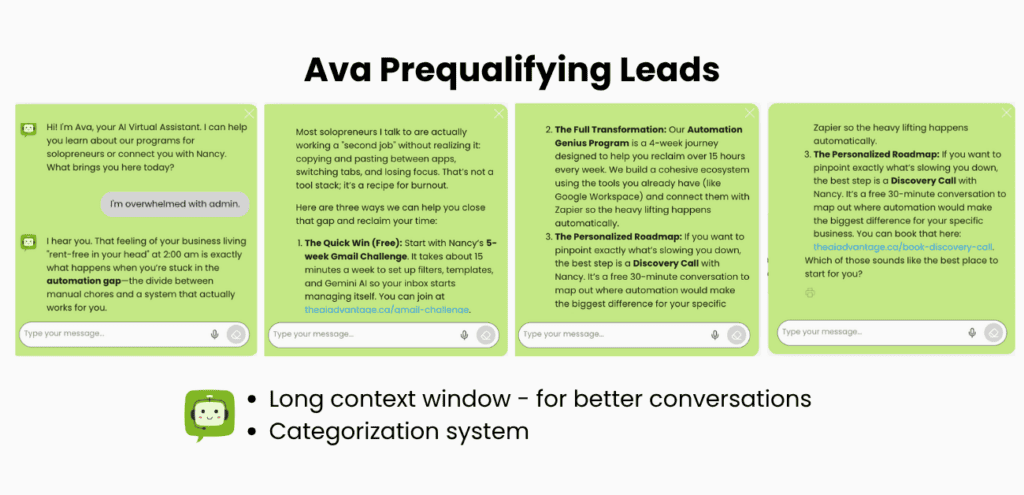
She knows exactly when to say: “The best next step is to book a Discovery Call with Nancy.”
And she says it with live links. At any hour. Without me.
Part IV: Step 3 — The Command Centre (The Workspace Studio Flow)
This is where the rubber meets the road.
When a visitor finishes a conversation with Ava, I don’t have to log into WordPress to find out what happened. My tools tell me.
Here’s the magic:
WordPress emails the transcript to my Gmail. Every completed chat generates an automatic email with the full conversation.
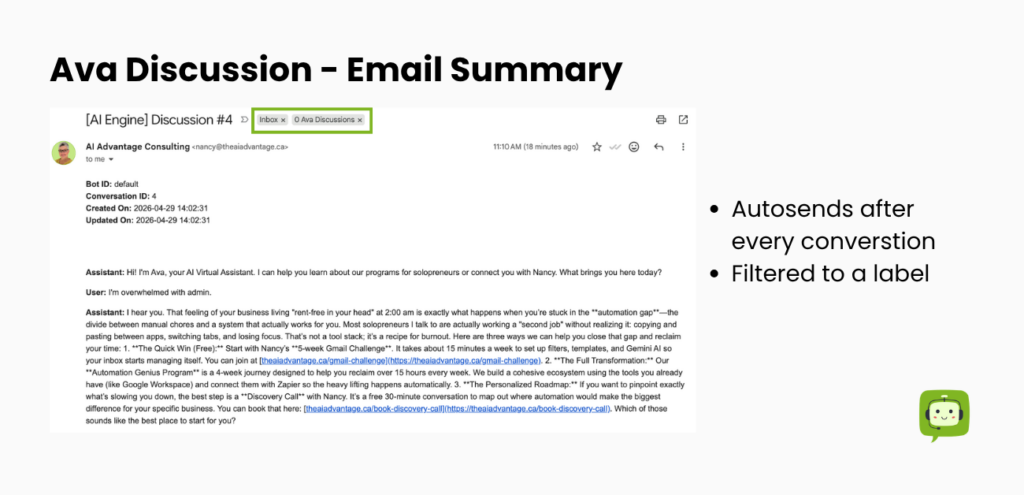
A Gmail filter catches it and routes it. Same filter logic I use across my entire operating model – invisible, automatic, already done before I open my inbox.
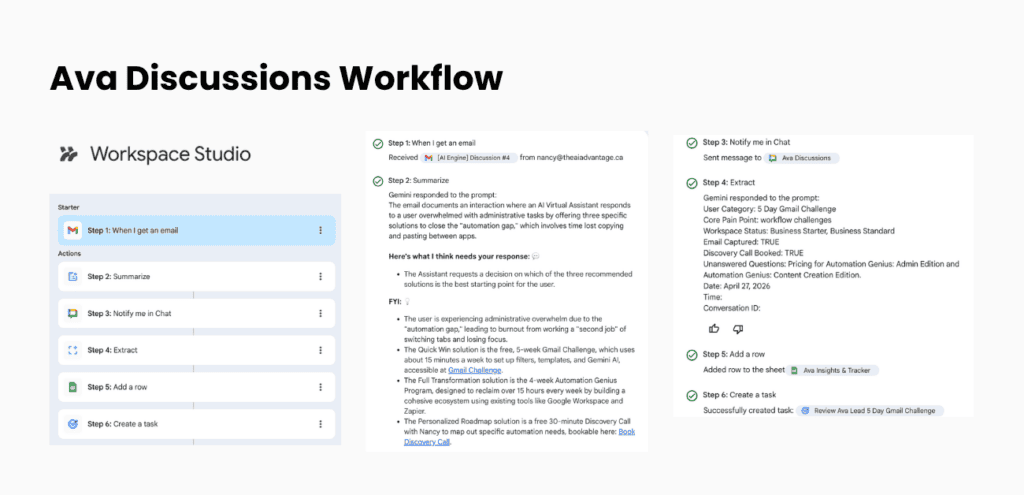
Workspace Studio catches the filtered email. The flow I built in Studio takes over from there. It uses Gemini to read the transcript and summarize the lead’s intent — what they asked, what they need, where they are in the decision making process.
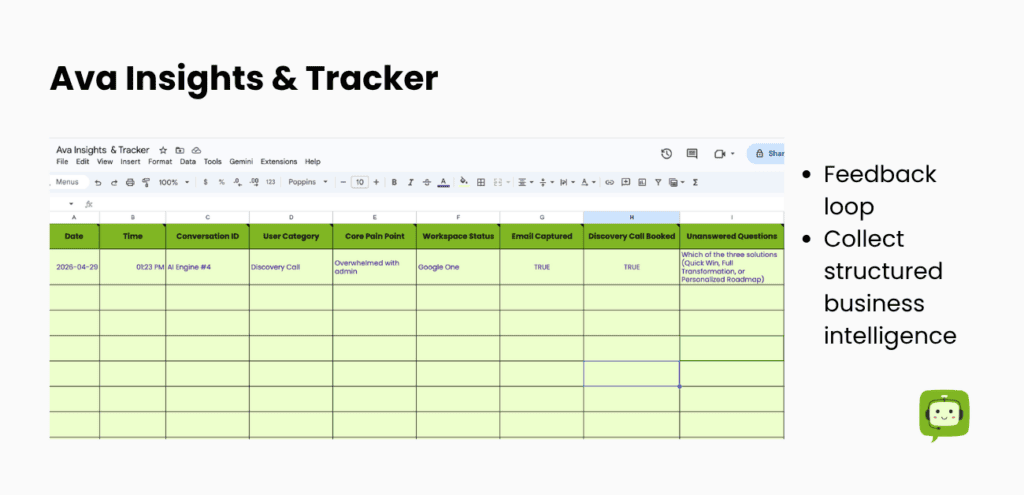
A line item is added to my Ava Insights Tracker. Chat logs = business intelligence. That email notification shared in the last screenshot (above) = messy data. I’ve created a feedback loop to structure the data via Sheets that will tell me exactly what to build next.
Google Chat pings my phone. Within minutes of the conversation ending, I get a notification with a Gemini-written briefing:
“New Lead: They are interested in the Automation Genius program. Here is a summary of their specific challenges.”
I also set keyword triggers. If someone uses the words price, quote, or consult during the chat – I’m notified immediately.
This is the same Workspace Studio logic I used to automate my expense tracking. If you haven’t read that post yet, start there — because my bookkeeping hat doesn’t fit well either.
And if you’re wondering why I chose Google Workspace tools for all of this instead of a third-party stack, this post answers that question directly.
Part V: Why This Is the Gold Standard for 2026
Three reasons.
Speed. When Ava has a conversation, I know about it within minutes. That means I can follow up while the person is still thinking about their business..
Efficiency. Ava handles the repetitive 90%. The pricing questions. The “where do I start?” conversations. The lead qualification I used to do manually via inbox.
Scalability. This is the gold star that changes everything. If I write a new blog post tomorrow, I turn it into a structured Doc, export to PDF, and add it to the knowledge base. Ava knows it by the time the post goes live. If I launch a new offer, same process. If my pricing changes, I update one Doc. Done.
I can add 100 documents to Ava’s brain without touching a plugin, rewriting a prompt, or calling a developer. The system was designed for that from the start — because it was built on Google Drive.
Ava is one of my best business assets.
Ready to Become an AI-First Solopreneur?
I built this for my business – and I can build it for yours too.
If sales makes you cringe (too) – let’s talk.
I handle the tech, the knowledge base structure, the Workspace Studio notification flow, and the initial setup so your digital assistant knows your business the way Ava knows mine. You show up. Your tools do the rest. A Genius bot – without the Genius price-tag.
Let’s find out if your business is ready for its digital twin.
P.S. — Sales hat on.
Not ready for a full build yet? Start here:
- Business Automation Breakthrough Session — 90 minutes, $197. We map your automation opportunities and leave with a clear plan.
- Automation Genius: Admin Edition — The full transformation. Done together.
- Free Discovery Call — Not sure where you fit? Start here. No pressure.
Sales hat off. 🎩