
For two decades, I didn’t need a way to manage client interactions.
I knew my clients’ kids’ names. I watched some of them grow up. When you work with the same people, month after month, year after year, you don’t need a system to remember them. You just do.
Then my business changed.
More leads, one-off projects, and more new conversations happening at once. And the things I used to hold in my head without even trying started slipping.
Repetition had been my system. And repetition wasn’t working anymore.
TLDR
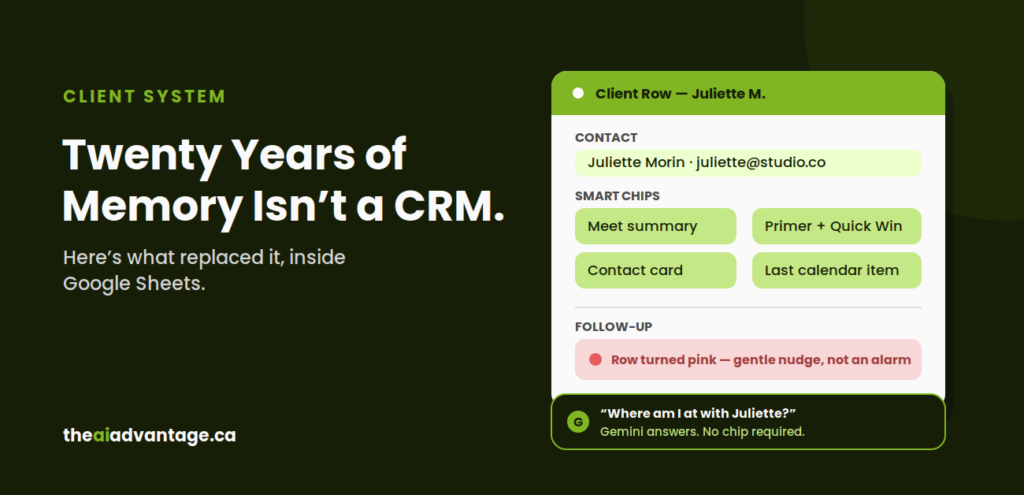
I built a client management system entirely inside Google Sheets, using Smart Chips and Gemini, instead of adding a separate CRM tool. Every Discovery Call booking creates a new row automatically. A notification lands in Google Chat, not my inbox. Smart Chips surface the meeting summary, contact card, Primer Doc, and last calendar activity in one place. If a follow-up date passes, the row turns pink, not red. Some days I don’t even open the spreadsheet. I just ask Gemini, “Where am I at with Juliette?” No new subscription. No new tool to learn.
Why It Matters
I’ve looked at HubSpot more than once.
And always end up walking away. It’s a learning curve. A different UI. Another tool and another subscription to manage. I’d be exporting client information that already lives inside Google Workspace.
And Gemini in Google Workspace already knows more about my business than any CRM ever could. Emails, meetings, notes, documents, forms, calendar, contacts, project history. All of it connected and in one place.
So instead of adding a new system, I built one instead.
The System, Step by Step
Step 1: The Discovery Call Triggers the Row
Someone books a Discovery Call. That submission creates a new row in Google Sheets automatically. I’ve covered the intake and Primer Doc mechanics that lead up to this in detail already, so here I’ll stay with what happens once that lead becomes a row I have to manage over time.
Step 2: The Notification Skips My Inbox
A notification lands in Google Chat, not my inbox. My inbox is a place I can get lost in a rabbit hole. Chat is clean. Stellar actually. And where I don’t lose time.
Step 3: Smart Chips Hold Everything in One Place
This is the “everything in one place” part that replaced my memory. Smart chips inside that row point to:
- The meeting summary, what was discussed
- The contact card, who they are
- The Primer Doc and Quick Win, already built
- The last calendar item, where things stand
No more searching. No more opening four different tabs to piece together where I’m “at” with a client.
Step 4: The Color Logic Is Pink, Not Red
If a follow-up date passes, the row turns pink to notify me at a glance.
Not red. That would feel like an alarm. And who wants a spreadsheet yelling at you every time you open it? That small detail matters to me. Because a system you dread opening is a system you stop opening.
Step 5: Some Days, I Skip the Spreadsheet Entirely
And if I can’t “spreadsheet” that day? I don’t even open the chip. I just ask Gemini: “Where am I at with Juliette?”
And it tells me. With personal intelligence enabled, Gemini understands context and manages multi-step requests across your Google Workspace apps, instantly. All built into your current business standard subscription.
Common Mistakes to Avoid
Building it and never feeding it. Smart chips are only as good as the information they’re pointing to. If the intake form and the notification aren’t running, the chips have nothing to surface.
Coloring the follow-up flag red. A system that feels like an alarm is a system you’ll start avoiding. Pick a color that nudges instead of hollers.
Clicking through the chip every time instead of asking Gemini. Can’t “spreadsheet” that day? Ask Gemini. Half the value of this system is not having to open anything at all.
Waiting for the “real” CRM before you start. I looked at HubSpot more than once and walked away every time. You don’t need a more sophisticated tool. You need the one you’re already paying for to put all the pieces together in one place.
FAQ
Do I need real CRM software to do this? No. This runs entirely on Google Sheets with Smart Chips, plus Gemini for the shortcut. A Google Sheet can be your CRM. The system cares about the flow of information, not the sophistication of the tool underneath it.
What are Smart Chips in Google Sheets? They’re linked, interactive references inside a cell, a doc, a contact, a calendar event, that expand into a preview without leaving the spreadsheet. That’s what lets one row hold everything about a client instead of scattering it across tabs.
Can I really just ask Gemini instead of opening the spreadsheet? Yes, as long as you have personal intelligence enabled. Ask it something specific, like a client’s name and what you need to know, and it pulls the answer straight from what’s already there.
Will this hold up once I have more clients than I can track by memory? That’s exactly the problem it solves. I built this system because repetition stopped being enough for me. The row and the chips do the remembering once your client list outgrows what you can carry in your head.
What if I already pay for HubSpot or another CRM? Then this might be the case for stepping away from it. The question worth asking is whether that tool is doing something Google Workspace can’t already do for you.
Quick Win Summary
For twenty years, memory was my system. It worked until my business grew past what I could hold in my head. Instead of adding a new CRM, I built one inside Google Sheets: an automatic row, a Chat notification, Smart Chips that keep everything about a client in one place, and a color code that nudges instead of alarms. Some days, I skipit all and just ask Gemini.