I used to spend the first half of every discovery call catching up.
Their goals. Their tools. Their bottlenecks. By the time I found where their week was actually unravelling, half the call was gone. We never got to the part that mattered in that half hour.
Then there was the gap before the call even started. Someone books. I send the calendar invite. Then nothing for three days. By the time we spoke, I was rebuilding trust from scratch, one small-talk question at a time.
Two different problems. One system fixed both.
TLDR
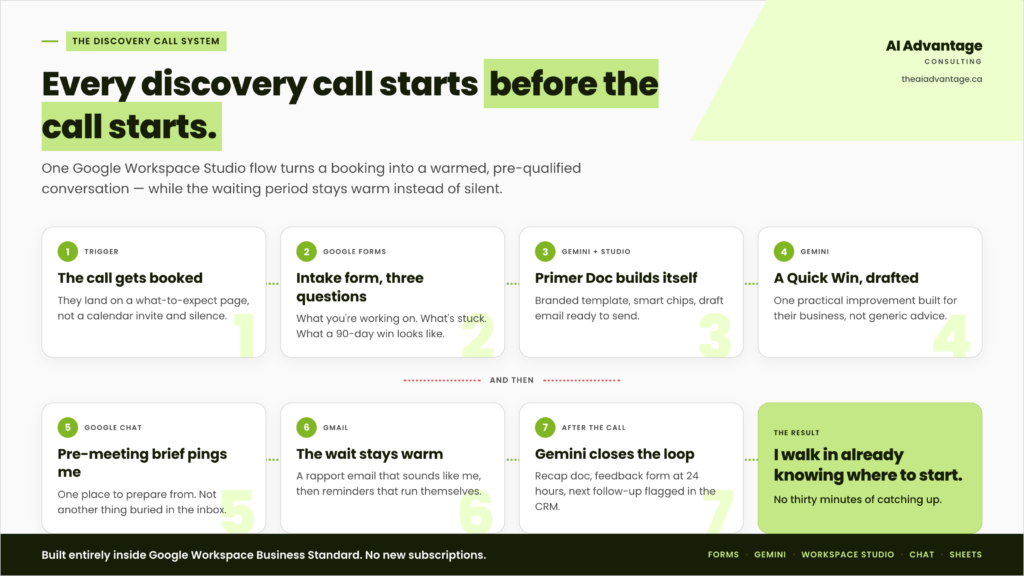
I built a Google Workspace Studio flow that turns a booked discovery call into a fully warmed, pre-qualified conversation before we ever meet. The moment someone books, an intake form captures their goals and stuck points. Gemini reads it, builds a Primer Doc, and drafts a Quick Win specific to their business. While they wait for the call, automated touchpoints keep the relationship warm instead of silent. I walk into every call already knowing where to start. This is built entirely inside Google Workspace Business Standard. No new subscriptions.
Why It Matters
A premium program doesn’t start on day one. It starts the second someone clicks “Book.”
Three days of dead air between booking and showing up doesn’t feel like nothing to the person on the other end. It feels like doubt creeping in. Did I make the right call? Is anyone actually going to help me?
And the thirty minutes I used to spend catching up wasn’t relationship building. It was me, unprepared, asking questions I could have already had answers to. That didn’t feel premium. It felt like a missed opportunity dressed up as small talk.
If you charge premium prices, the experience has to feel like premium from the first click, not just during delivery.
The System, Step by Step
Step 1: The Discovery Call Gets Booked
Someone lands on my booking page and picks a time. That’s the trigger for everything else.
The moment the booking confirms, they don’t just get a calendar invite and silence. They land on a custom page with what to expect, a few client stories, and answers to the questions they haven’t even asked yet.
Step 2: The Intake Form Captures the Real Problem
Right behind the booking, an intake form goes out. Three questions, that’s it: what are you working on, what’s stuck, what would a win look like in the next 90 days.
This isn’t just a formality. It’s the raw material for everything Gemini builds next.
Step 3: Gemini Reads the Form and Builds a Primer Doc
The moment someone submits that form, a Workspace Studio flow picks it up. Gemini reads the responses, pulls out the goals, the challenges, the stuck points, and builds a branded Primer Doc automatically from a branded template. Smart chips keep assets organized and easy to find with quick links to my contact card, the calendar event, and a bonus resource. A draft email is prepared with the primer, and a notification is sent to me in Chat.
At our meeting, I’m not reading a raw form response five minutes before a call. And my client already has a branded document sitting in their inbox that shows I was listening before we ever spoke.
Step 4: Gemini Drafts a Quick Win
Same flow, next step. Gemini takes what it just learned and drafts a Quick Win: one practical, business-specific improvement based on exactly what they shared.
This is the part that changes the whole call. I’m not walking in with generic advice. I’m walking in with something built for their business, before I’ve said a single word to them.
Step 5: The Pre-Meeting Brief Lands in Chat
Both the Primer Doc and a rapport email are drafted in email. I get notified in Chat.
I’ve got one place and one document to prepare from for the call. By the time I sit down to meet, I already know where to start.
Step 6: The Waiting Period Stays Warm
Here’s what happens between booking and the call, instead of nothing:
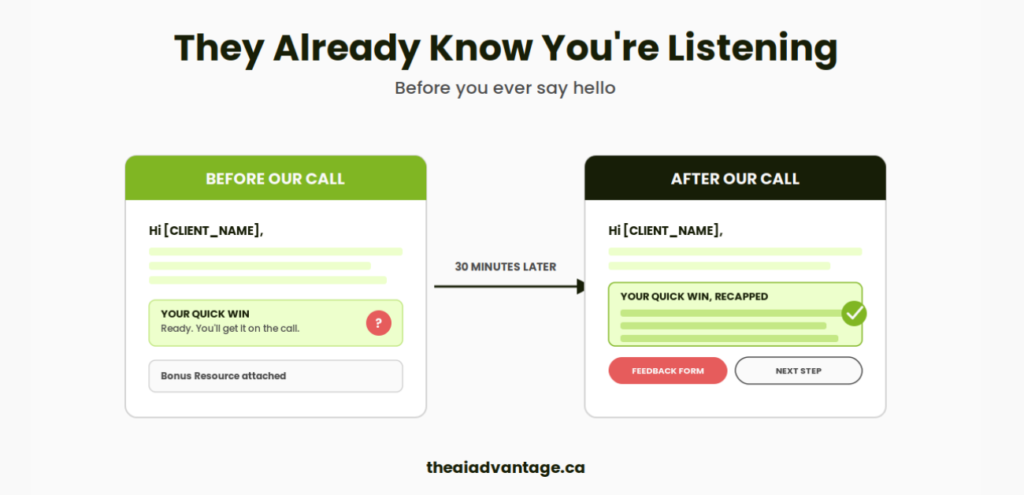
A rapport-building email goes out. Not a receipt. A real “I’ve been where you are” message that sounds like me, not like an autoresponder.
Automated reminders keep the conversation alive without me lifting a finger.
Step 7: After the Call, Gemini Closes the Loop
The second the call ends, Gemini drafts the recap before I’ve even closed my laptop. But it doesn’t stay a recap. It becomes a second branded document, the mirror of the Primer: the Quick Win, now written out in full instead of teased, a bonus resource, a feedback form, and my honest read on the right next step.
Nothing about it depends on either of us remembering the call three days later. A feedback form goes out 24 hours after. And if the deal stalls, my CRM flags the next follow-up automatically, so that doesn’t depend on my memory either.
Common Mistakes to Avoid
Treating the intake form as optional. The form is the entire engine. Skip it, and Gemini has nothing to build the Primer Doc or Quick Win from. You’re back to catching up live.
Routing notifications to your inbox instead of Chat. If this lands in your inbox, it competes with everything else already drowning you in there. Keep it somewhere you’ll actually see it.
Building the Quick Win prompt too generically. If Gemini’s draft reads like it could apply to anyone, the prompt needs more specific instruction. The whole value of this system is specificity.
Skipping the post-call automation. The system doesn’t end when the call does. If you don’t close the loop with a recap and a flagged follow-up, you’re right back to relying on memory for the part that decides whether the deal moves forward.
FAQ
Do I need a paid tool outside Google Workspace to build this? No. This entire system runs on Google Workspace Business Standard: Forms for intake, Gemini for the Primer Doc and Quick Win, Workspace Studio for the automation, Chat for notifications, and Sheets for the CRM layer underneath it.
What is Google Workspace Studio? It’s Google’s no-code tool for building automated, multi-step workflows across your Workspace apps. Availability and specific permissions can vary, so it’s worth checking your Admin Console before building this out for a client.
How long does this take to set up? Building the intake form and the Workspace Studio flow takes an afternoon once you know the steps. Refining the Quick Win prompt so it sounds like you, not a generic AI, takes a bit more iteration.
Will this work if I don’t have a formal CRM? Yes. A Google Sheet can be your CRM. The automation cares about the flow of information, not the sophistication of the tool underneath it.
What if a lead doesn’t fill out the intake form? The call still happens, just without the head start. Worth a gentle nudge in the reminder sequence, but don’t gate the call behind it. Some people fill it out in the waiting room five minutes before.
Quick Win Summary
Every discovery call starts before the call starts. Capture the real problem the moment someone books, let Gemini turn that into a Primer Doc and a Quick Win, keep the waiting period warm instead of silent, and close the loop automatically when the call ends. None of it requires a new subscription. It’s already sitting inside the Workspace plan you’re paying for.