
Last verified September 2026.
TLDR:
Gemini is included in your Business Standard licence, but it only works once four separate layers line up: the subscription, the Admin console switches, your Gmail smart features settings, and a one-time connection handshake in the Gemini app. Layer three is the one that breaks most setups, and it lives in your own Gmail settings, not the Admin console. Nine steps, about fifteen minutes, and one test prompt from your own inbox to prove it worked.
 AI Advantage Consulting
Activate Gemini in Google Workspace Business Standard
A step-by-step solopreneur workbook for setup, security, and everyday use.
You pay for Business Standard. Gemini is included. So why does half of it look switched off? Nine steps, fifteen minutes, and one test prompt from your own inbox to prove it. Tick the boxes as you go. Your progress is saved in this browser.
Gemini is included and Gemini is working are two different states.
Getting from one to the other means walking a short chain of settings that live in four separate places. Some are in the Admin console. Some are in your own Gmail settings. One is buried inside the Gemini app itself. Miss one link and the whole thing feels broken. You will see the sparkle icon but get no useful answers. Or you will type @Gmail and watch Gemini shrug.
This workbook walks the full chain in order. It also flags the places where Google's own documentation will send you looking for a button that does not exist on your plan.
The four layers
Your Business Standard licence includes Gemini. No add-on purchase required.
Which Gemini surfaces exist for your account at all: the Gemini app, Gemini Notebook, Workspace Studio, Meet note-taking.
Whether Gemini is allowed to touch your Gmail, Drive and Calendar content. This is the layer almost everyone misses.
The one-time authorization inside the Gemini app that links it to your Workspace data.
All four have to line up. Layer 3 is the usual culprit when things look dead.
Stop hunting for the Feature access panel. It is not on your plan.
Search for how to turn on Gemini and you will land on a Google support page called Manage access to Gemini features in Workspace services. It tells you to open the Admin console, go to Generative AI, then Gemini for Workspace, then click Feature access and toggle Gmail, Docs, Sheets and the rest.
Read the line at the very top of it. Supported editions: Enterprise Standard and Enterprise Plus, plus certain Education tiers. Business Standard is not on that list. Per-service Gemini toggles are an Enterprise feature.
The good news: on Business Standard, Gemini in Gmail, Docs, Sheets, Slides and Drive is on by default and cannot be turned off individually. If Gemini is not appearing in those apps, the problem is never Feature access. It is one of the other layers, almost always your smart features settings. That saves you a step.
Gemini Setup Workbook
Every Gemini setting on Business Standard, in one printable guide.
Nine steps with fillable checkboxes and every screenshot. Work from paper while you're in the Admin console.
You'll also get my weekly email on Google Workspace and AI for solopreneurs. Unsubscribe anytime.
Confirm what you are working with
Verify the subscription and licence
1 min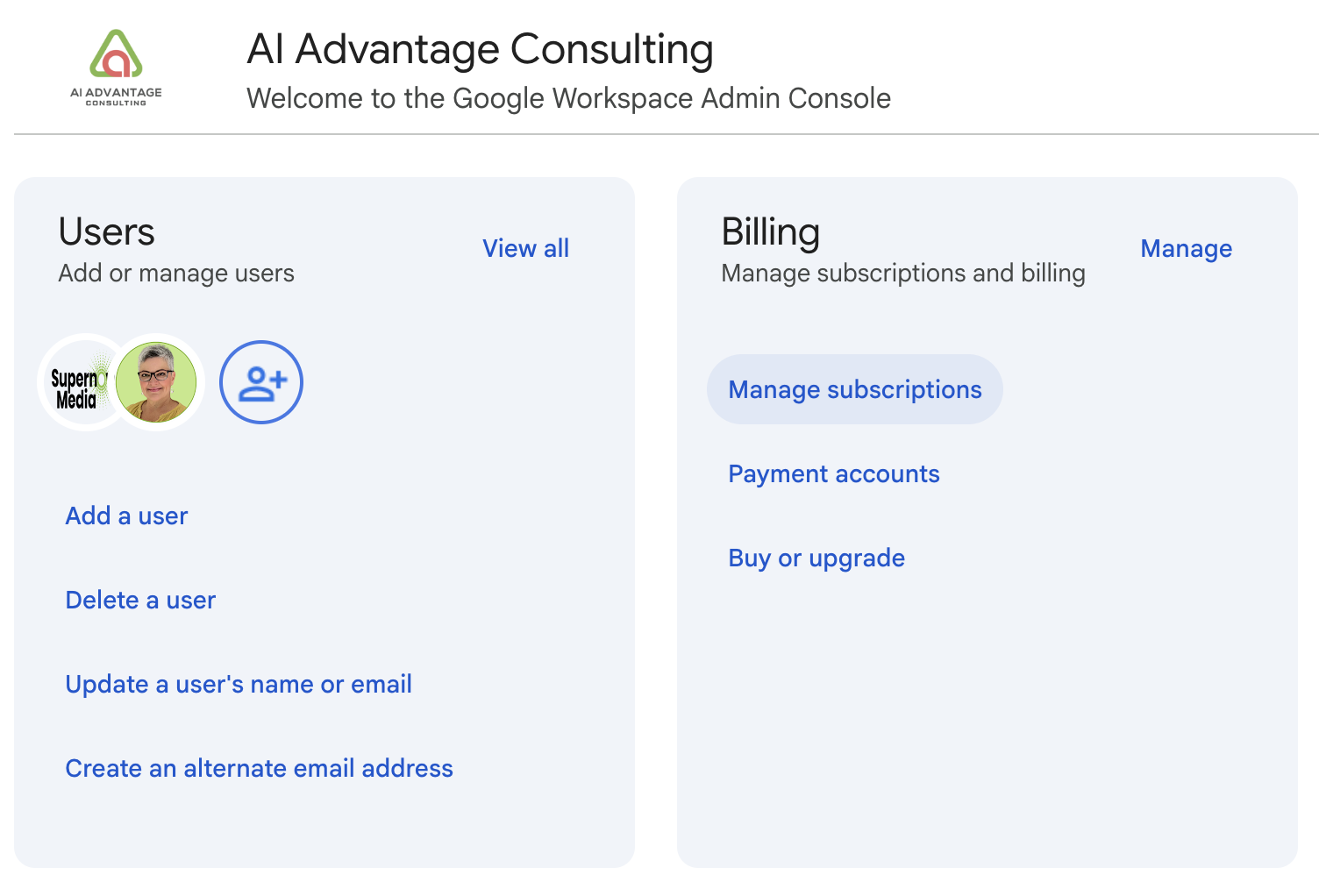
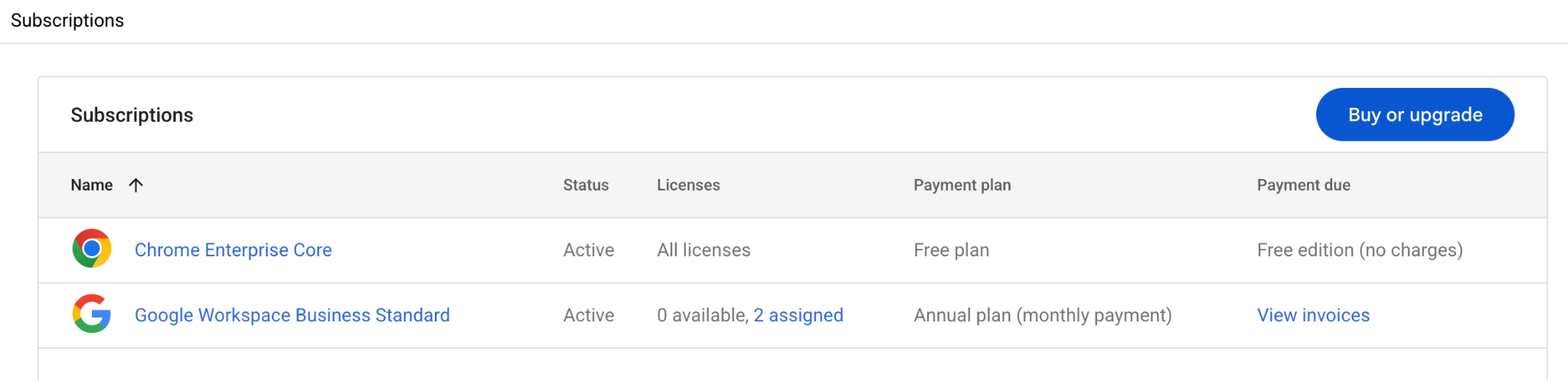
Use the same account for admin work and daily work. As a one-person business you have no reason to split them. Apply every setting in this workbook to the top-level organizational unit.
You do not need to buy a separate Gemini for Workspace add-on. Those add-ons were discontinued in January 2025 when Gemini folded into the core Business and Enterprise plans. If a blog post tells you to purchase Gemini Business, that post is out of date. There is a current paid add-on called AI Expanded Access, available since March 2026. It buys higher usage ceilings, not new access. More on that in Part 5.
The Admin console layer
Everything in this part lives under Generative AI in the left menu of admin.google.com, unless noted. You need the Gemini Settings administrator privilege, which super admins have by default.
Turn on the Gemini app
2 minThis controls gemini.google.com, the mobile apps, and Gemini in Chrome. It has no effect on Gemini inside Gmail or Docs. Those are separate.
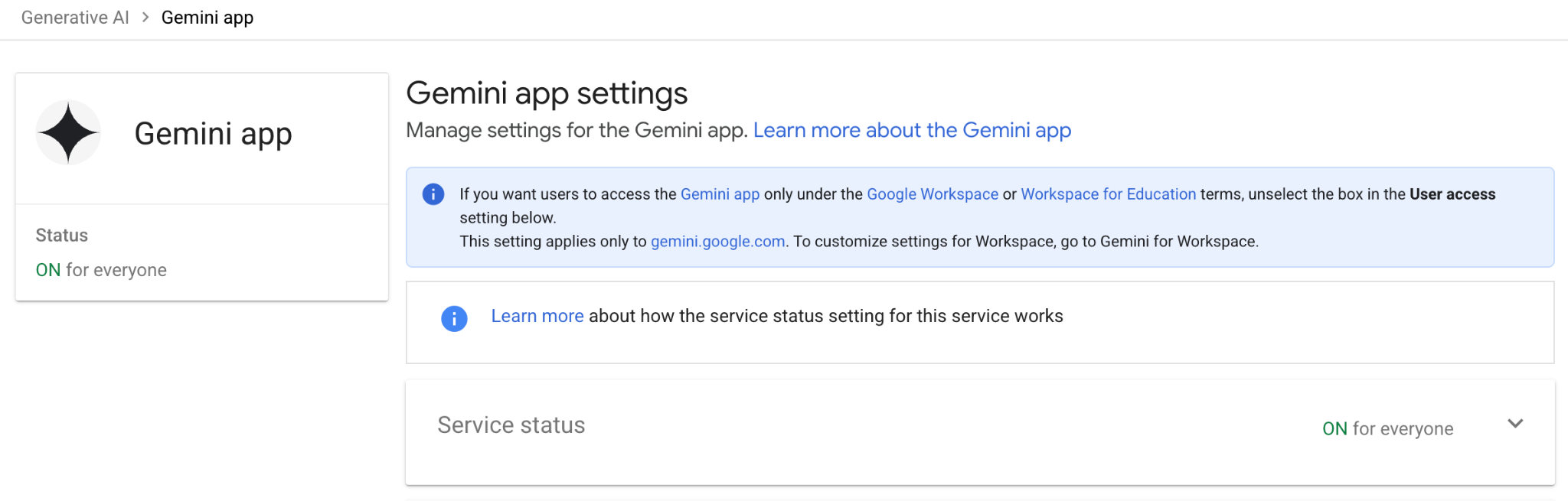
Two more panels while you are here.
User access. There is a checkbox for letting all users reach the Gemini app regardless of licence. As a solo operator with a Business Standard licence, you do not need it. Leave it alone.
Gemini conversation history. This matters more than it looks. It controls whether your chats are saved and for how long. It is on by default at 18 months, and you can set 3, 18 or 36 months, or switch it off.
Let the Gemini app reach your Workspace data
2 minThis is the setting that turns Gemini from a general chatbot into something that knows your business.
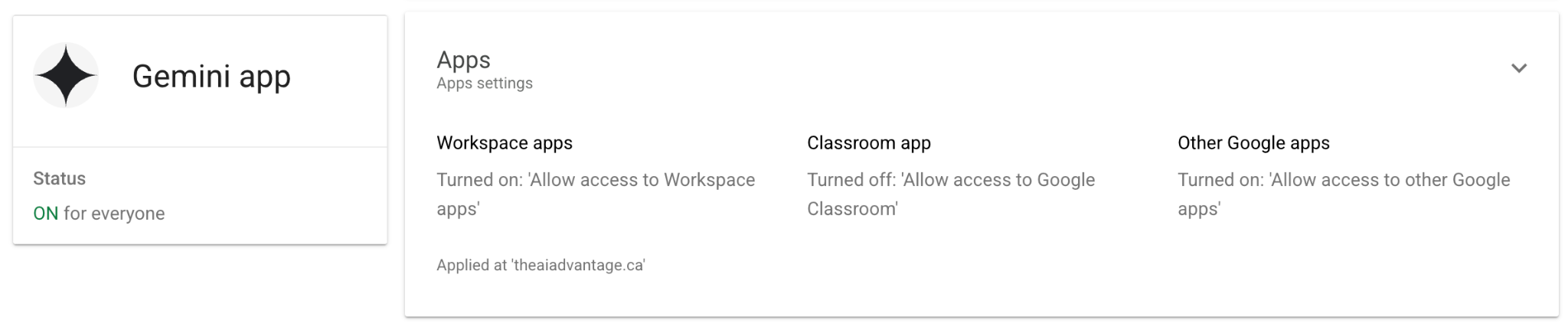
Google says Workspace apps is on by default. Check it anyway, especially if you inherited the tenant from someone else or tightened privacy settings at some point. Changes can take up to 24 hours, though they usually apply much faster.
A detail most guides skip: if one prompt asks for actions across several services and one of them is switched off, none of the actions complete. Ask for a calendar event plus a reminder while Tasks is disabled and you get neither. It fails silently as a whole, not partially.
Turn on Gemini Notebook
1 minThis is NotebookLM. Google renamed it. It has its own toggle, separate from everything above, and it is genuinely underused by solopreneurs. Upload your SOPs, client transcripts, course notes and past proposals, then ask questions grounded in those sources with inline citations.
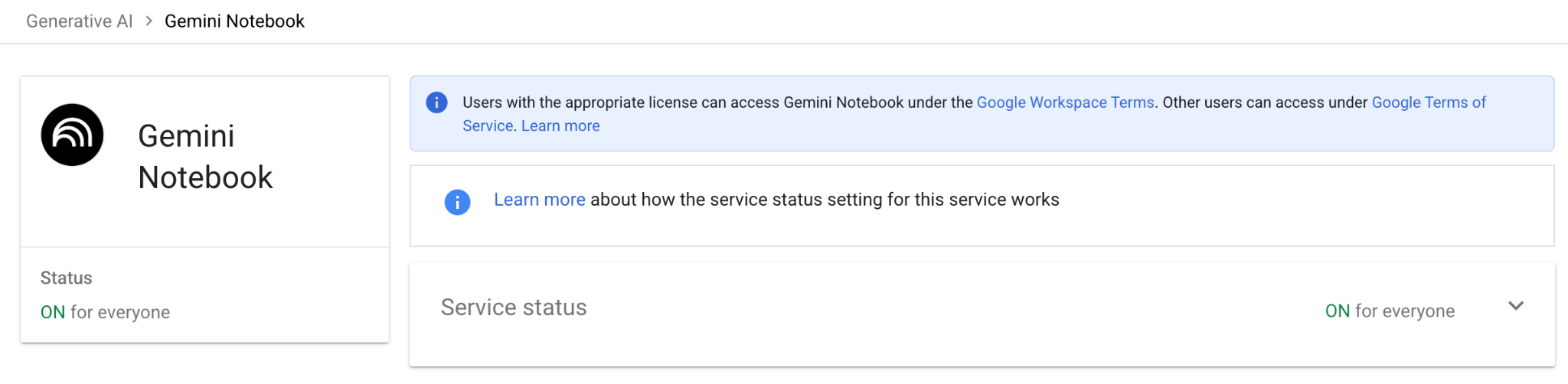
On Business Standard, Gemini Notebook is a core service with enterprise-grade privacy: your uploads and chats are not reviewed by humans or used to train models. You also get what Google calls Higher Level Access.
| What | Your limit on Business Standard |
|---|---|
| Notebooks | 500 per user |
| Sources per notebook | 300 |
| Chats | 500 per day |
| Audio overviews | 20 per day |
| Video overviews | 20 per day |
| Reports | 100 per day |
| Deep Research | 20 per day |
| Mind maps, quizzes, flashcards | 100 per day each |
Compare that to the free consumer tier at 100 notebooks, 50 sources and 3 audio overviews a day. Your licence is doing real work here.
Turn on Workspace Studio
1 minWorkspace Studio is where you build automations without code. Google calls them flows; it replaced the earlier "agents" naming. It is not under Generative AI. This trips people up.

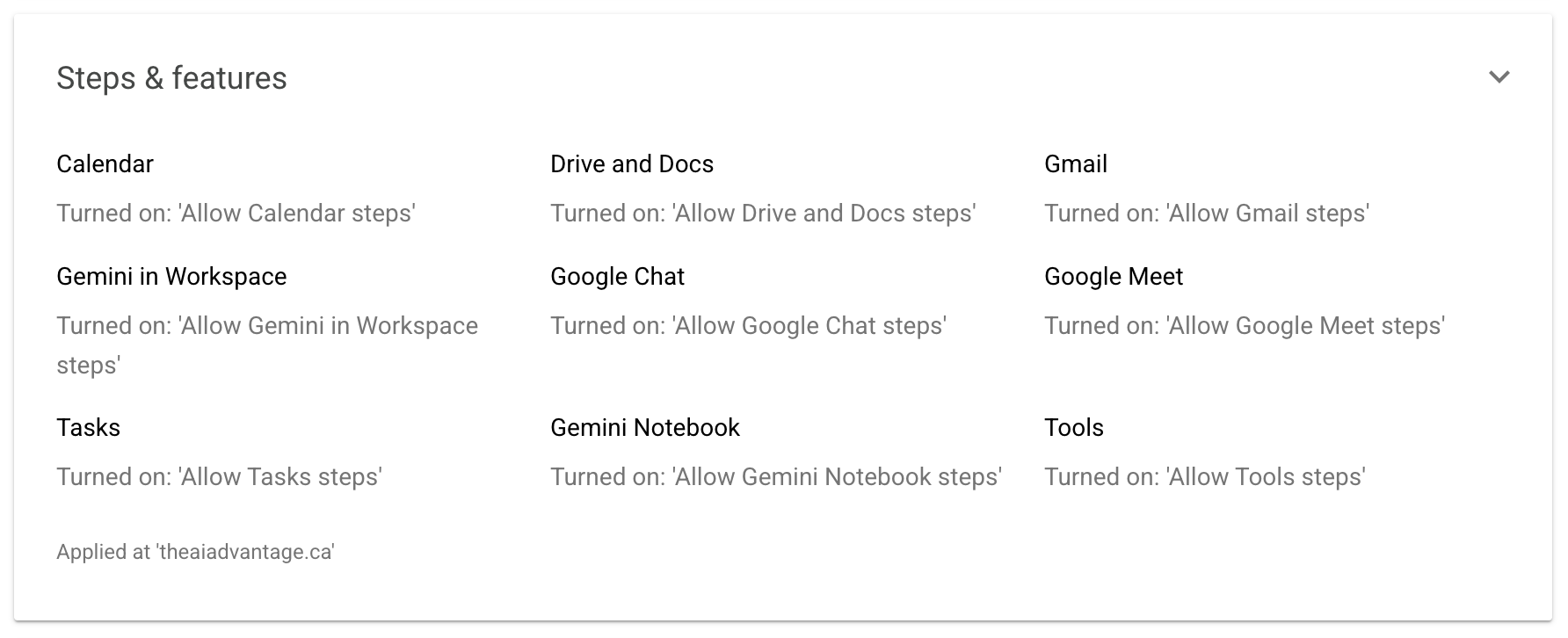
This one needs the Service Settings admin privilege rather than the Gemini one. Super admins have both. Business Standard is a supported edition.
Set up Meet note-taking
2 minGemini writes up your client calls while you stay in the conversation.
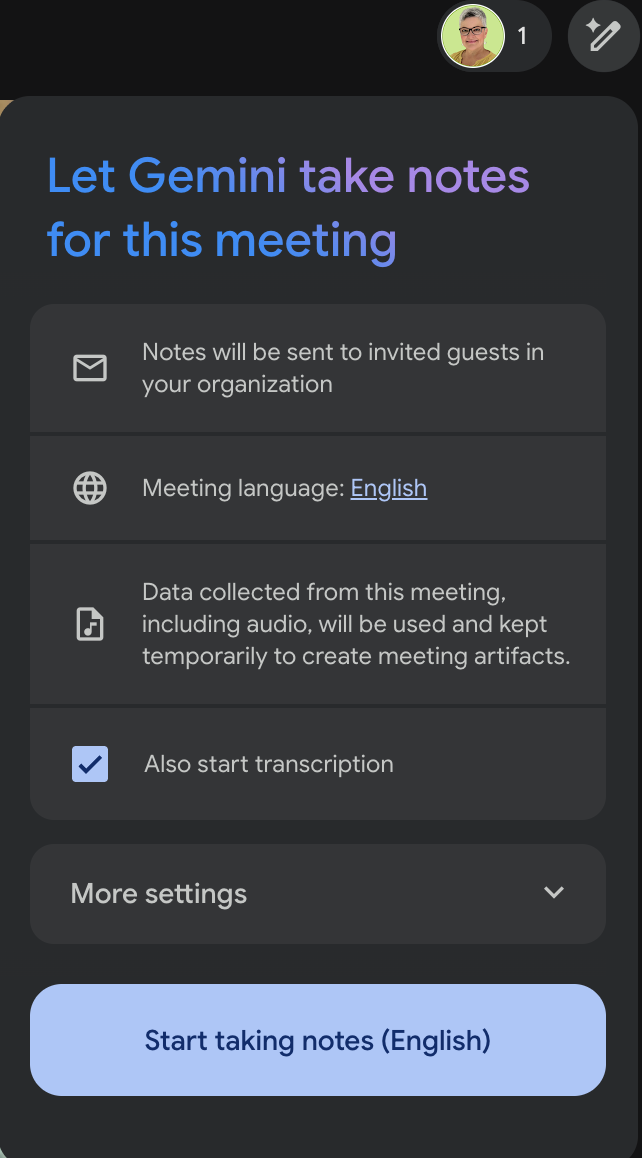
Notes getting created and notes getting shared are separate settings. Sharing defaults to invited guests inside your organization, which for a one-person business means you. Also start transcription is checked by default in the in-call panel, so you get a full transcript alongside the summary. Uncheck it if you only want the notes.
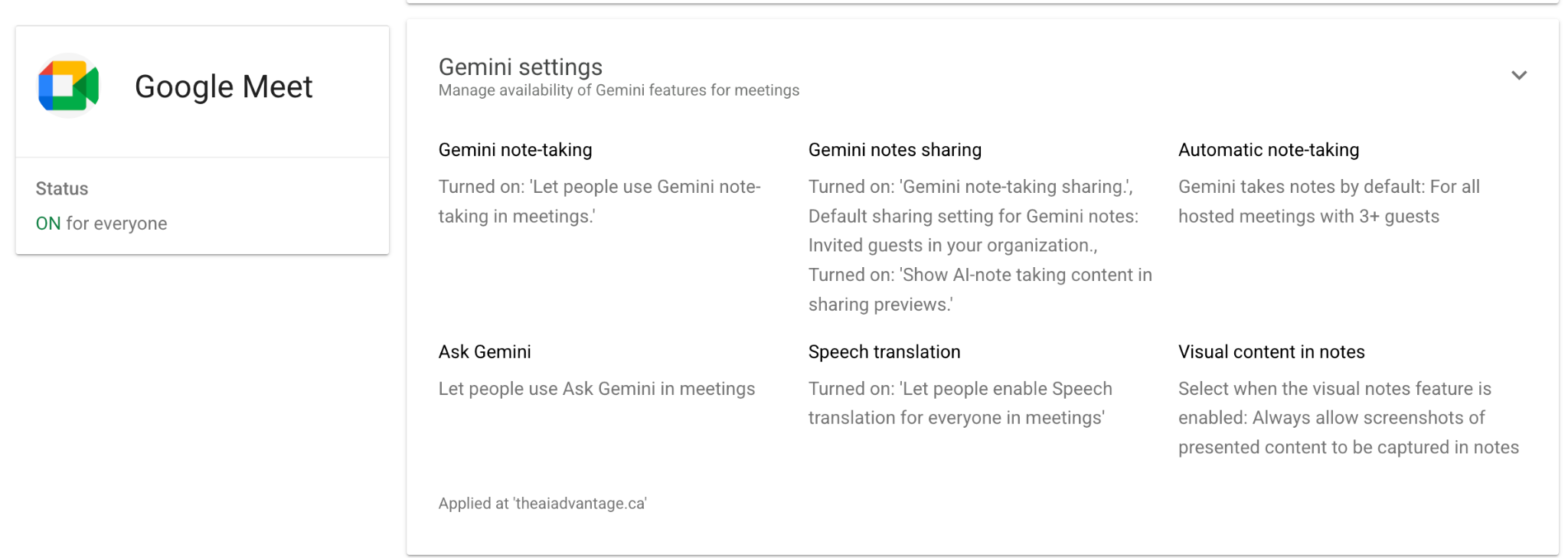
Every set of notes lands in three places: the meeting organizer's Drive, in a folder named "Google Meet" with a sub-folder per meeting; attached to the Calendar event; and linked in the recap email sent to whoever your sharing setting covers.
Your own account settings
This is the layer that breaks most setups. The Admin console can be perfect and Gemini will still refuse to touch your data if these are off.
Smart features: there are three settings, not two
3 minGoogle split the old single smart features control into three distinct settings. Most guides written before 2026 describe two. Some describe one.
| Setting | What it controls | Affects Gemini in Workspace? |
|---|---|---|
| Smart features in Gmail, Chat, and Meet | Smart Compose, Smart Reply, inbox categories, summary cards | No |
| Smart features in Google Workspace | Personalized search, events from Gmail in Calendar, and Google Workspace with Gemini | Yes. This is the one. |
| Smart features in other Google products | Maps, Wallet, Personal Intelligence in the Gemini app | Yes, for the Gemini app connection |
The middle one governs Gemini in your Workspace apps. Google's admin documentation says it plainly: to access Gemini in Workspace services, users need smart features and personalization turned on. If a guide told you to enable smart features in Gmail, Chat and Meet and stop there, it left you short.
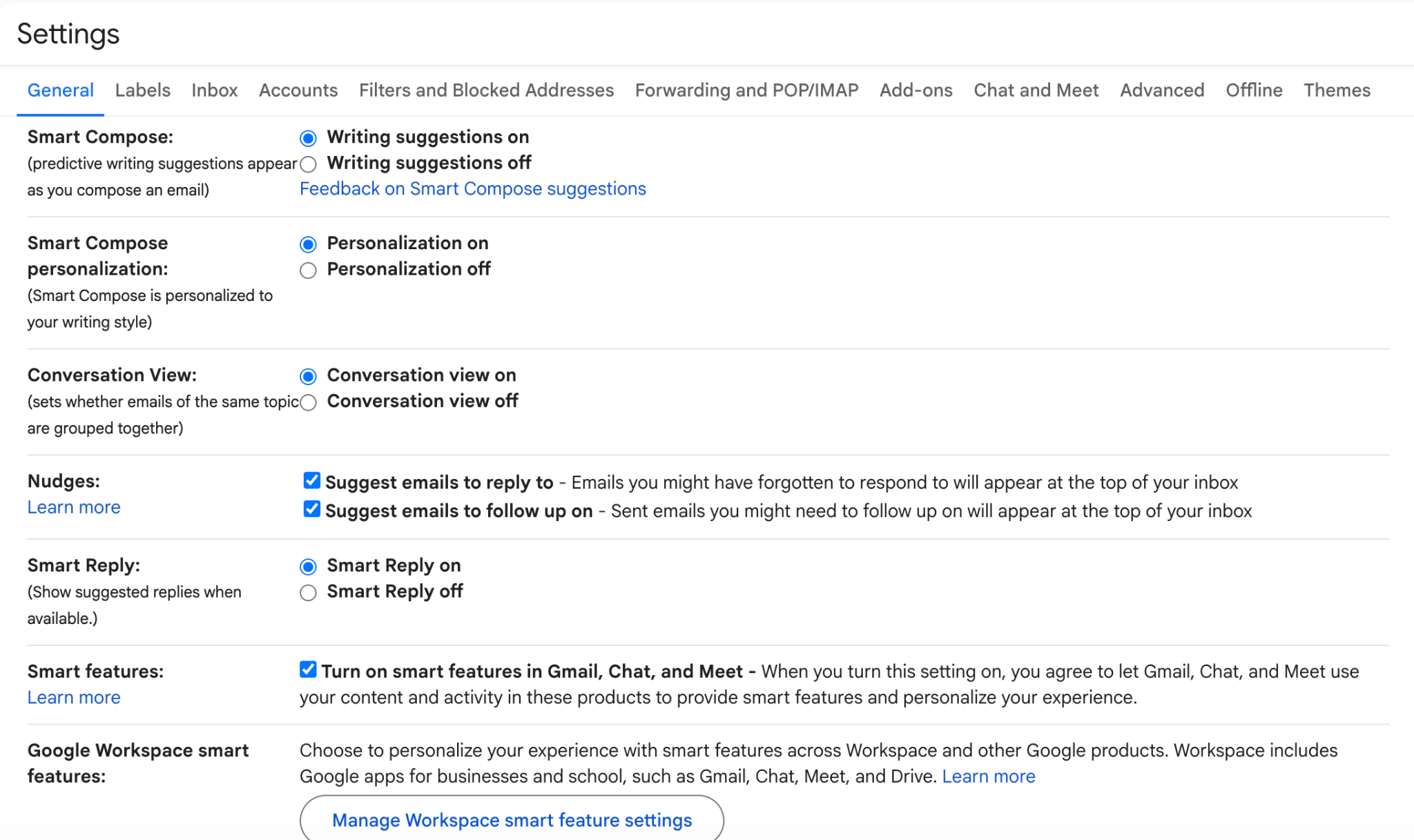
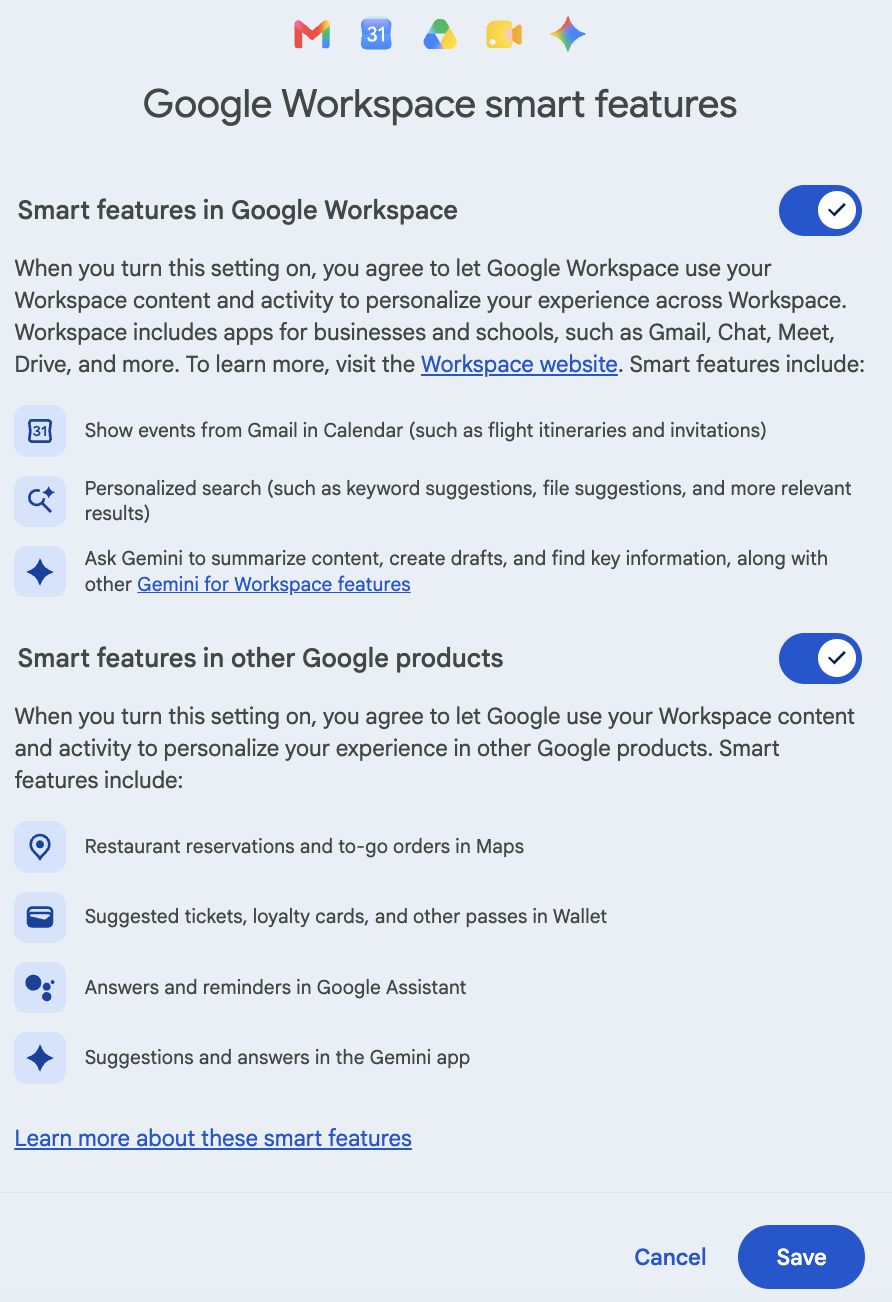
Regional defaults matter. Smart feature settings are off by default in the European Economic Area, the United Kingdom, Switzerland and Japan. Everywhere else, including Canada and the United States, they default on. But defaults get changed. Check regardless.
You can reach the same settings from Calendar, Drive, Chat and Meet. Same settings, different doors. Changing them anywhere changes them everywhere, on every device where you are signed in.
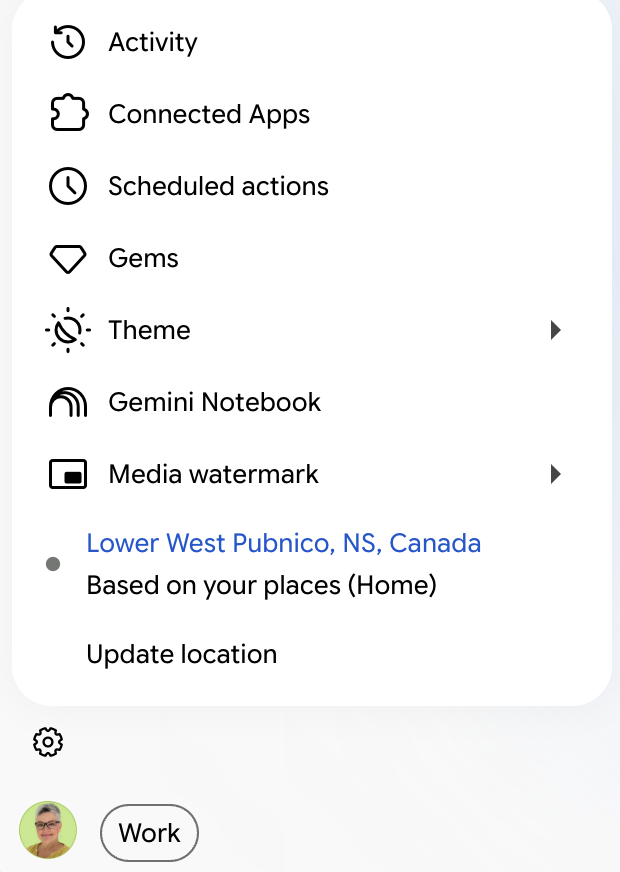
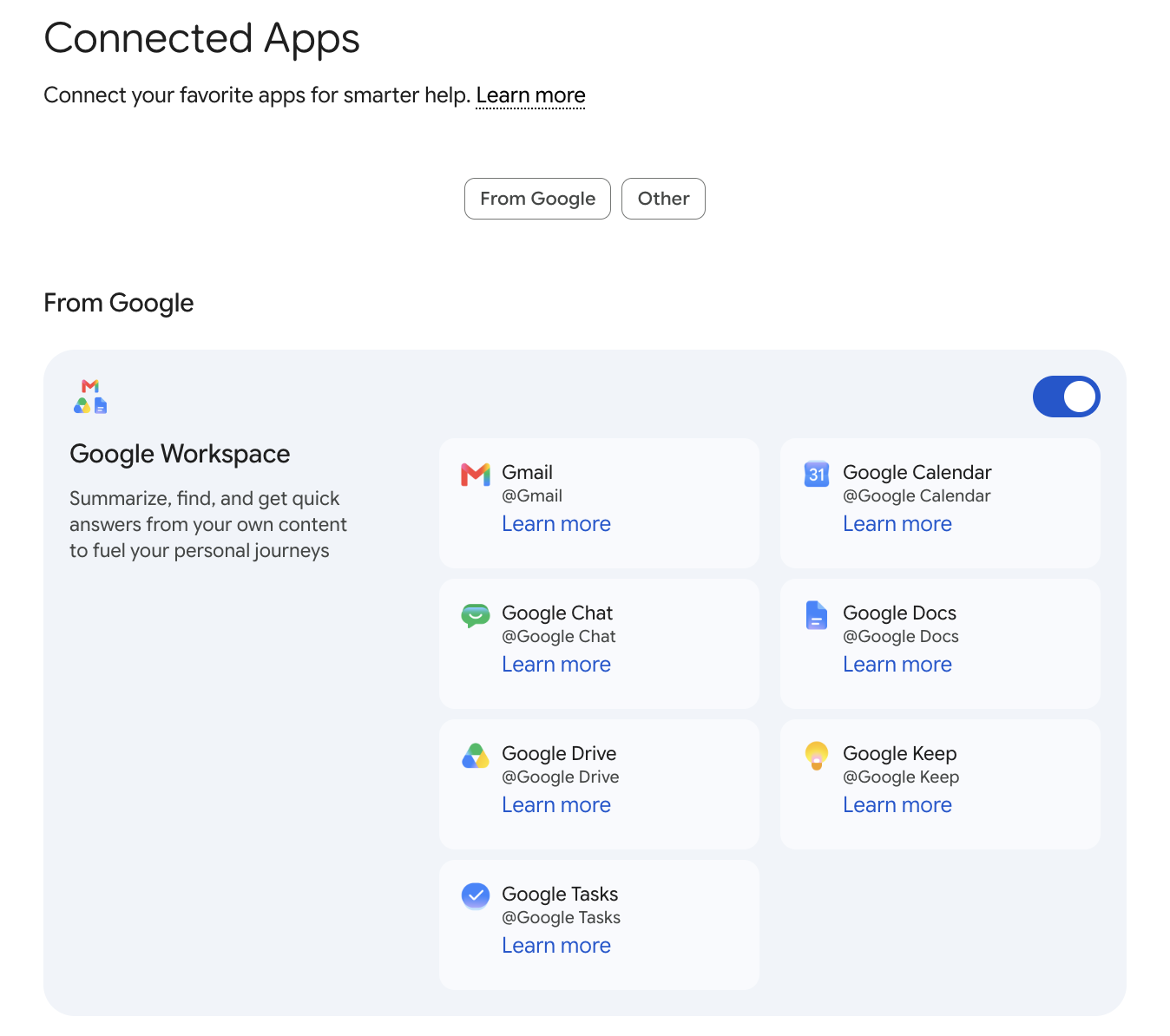
Turn on Keep Activity and Connected Apps
1 minTo connect the Gemini app to Workspace, your Keep Activity setting has to be on.
Connect and test
2 minThe rule that catches people out: reference the Workspace service in the first message of a new conversation. Follow-ups can then use the existing context. Start a chat about something else and try to bring in @Gmail halfway through, and it may not engage.
Five test prompts. Tick each one that comes back with real names and dates.
If you get real results from your own account, all four layers are live.
Where Gemini shows up
Gemini does not look the same in every app. In some it is a side panel. In some it is a dedicated field. In one of them there is nothing to click at all, and that is expected.
| Surface | How you reach it | What it is good for |
|---|---|---|
| Gmail | Ask Gemini sparkle in the navigation, opens the side panel. Also in-line: the magic wand in compose, the slash command, and Summarize this email | Summarizing threads, drafting and refining replies, cross-app search, scheduling |
| Docs | Ask Gemini side panel | Proposals, SOPs, workshop outlines, web copy |
| Sheets | Ask Gemini side panel, plus the AI function in cells | Formula help, analysis, building and cleaning tables |
| Slides | Ask Gemini side panel | Client decks, course slides, image generation |
| Drive | The Gemini icon opens a full dashboard, not a panel. The only app that works this way | Finding files, summarizing documents and PDFs |
| Calendar | No icon and no side panel. Works through smart features and @Calendar in the Gemini app | Schedule review, agenda prep, event creation |
| Meet | Pencil-and-sparkle icon, top right, but only once you are in a meeting | Meeting notes, transcription and follow-up |
| Chat | Click the search bar, then Ask Gemini. Opens as a pop-up | Summaries and drafting |
| Workspace Studio | Built in. Dedicated field to describe the task you want automated | Repeatable flows for intake, follow-up and admin |
| Gemini Notebook | Built in. Dedicated Ask Gemini field | Grounded research across your own source documents |
| Gemini app | Built in. The whole app is the prompt | Cross-app retrieval, planning, business operating queries |
| Admin console | Ask Gemini side panel | Step-by-step help with admin tasks |
| Apps Script | Ask Gemini side panel, once you have a project open | Code help, debugging, explaining a script |
| Google Analytics | Magnifying glass with a sparkle, labelled Ask Advisor | Traffic and conversion questions in plain language |
Calendar has no Gemini icon. Do not go hunting for a sparkle. It works through smart features and through @Calendar in the Gemini app.
Meet hides its icon until you are in a meeting. Check from the Meet landing page and you will think it is missing. Join a call and the pencil-and-sparkle appears top right.
Three things worth noticing in that Meet panel. It restates your sharing default, so you can see before you start that notes are staying inside your organization. You can start note-taking manually even when the admin auto-setting is off. And Also start transcription is checked by default, which creates a full transcript alongside the notes. Uncheck it if you only want the summary.
Gmail is the deepest of these by a wide margin. Custom instructions, AI Overviews in search, Help Me Write, Proofread, Help Me Schedule, and calling a custom Gem into the side panel. Full breakdown here: Gemini AI in Gmail 2026: What Solopreneurs Need To Know.
Two limitations worth knowing. On the Gemini mobile app with a Workspace account you cannot use Gems or Canvas; those are web-only for work accounts. And in Drive, Gemini cannot create folders, move items, count the contents of your mailbox or Drive, or read your photos and videos as connected-app data. It reads and summarizes. It does not reorganize.
What your licence really buys
Business Standard sits in a good tier. Here is what your licence buys, so you know when you are near a ceiling and when an upgrade would be pointless.
In the Gemini app
| Feature | Business Standard |
|---|---|
| Pro model | 25 prompts per 4 hours |
| Thinking model | 300 prompts per day |
| Fast model | General access |
| Context window | 1 million tokens |
| Deep Research | 20 reports per day |
| Image generation (Nano Banana 2) | 100 per day |
| Scheduled actions | 10 active at a time |
| Video generation (Veo 3.1 Lite) | 3 per day |
| Connect to Workspace apps | Included |
That 1 million token context window is the upgrade nobody talks about. Business Starter caps at 32,000. You can drop entire client histories into a single conversation.
Scheduled actions deserve a look if you have not tried them. Ten recurring prompts that run on their own. A Monday morning inbox digest. A Friday summary of the week's calendar. Set once, runs forever.
In the Workspace apps
| Feature | Business Standard | With AI Expanded Access |
|---|---|---|
| Sheets AI function | 5,000 per month | 25,000 |
| Sheets build and edit | 100 per month | 500 |
| Sheets canvas | 30 per month | 100 |
| Docs match style and format | 5 per month | 25 |
| Drive audio overviews for PDFs | 20 per day | 40 |
| Drive organize files | 30 per month | 150 |
| Slides generation | 100 slides per month | 500 |
| Nano Banana Pro images (Slides and Vids) | 30 per month | 300 |
| Vids video generation | 50 per month | 200 |
| Vids avatars | 25 per month | 100 |
Monthly limits reset at midnight Pacific on the first of the month. Daily limits reset at midnight Pacific. Nothing rolls over. Two things count against you unexpectedly: a follow-up asking Gemini to try again counts as a fresh use, and in Sheets, "how does VLOOKUP work" does not count but anything that builds or analyzes a sheet does. Workspace Studio usage limits start being enforced October 1, 2026; until then you have promotional access.
Should you buy AI Expanded Access? For most solopreneurs, no. These ceilings are generous for one person. The exception is heavy Vids or Slides production, or serious Sheets automation where 100 build-and-edit actions a month runs thin. Track your usage for a month before you spend.
The activation checklist
Work down the list. Every item should be a yes. This is the section to come back to after Google moves a menu.
Troubleshooting
Symptoms, causes and fixes. Work top to bottom.
Start with Connected Apps in the Gemini app: Settings → Activity → Connected Apps. This is the most common cause and the least documented. Then check, in order: Keep Activity off; Smart features in other Google products off; Workspace apps disabled in the Admin console; Gemini conversation history switched off, which silently kills integrations; or you did not mention the service in the first message of the conversation.
Most likely Smart features in Google Workspace is off. Gmail settings → General → Manage Workspace smart feature settings. This is the number one cause on Business Standard. Do not go looking for a Feature access toggle. It does not exist on your plan.
Working as intended. Calendar does not have one. See Part 4.
You are looking before you join. The pencil-and-sparkle icon only appears once you are inside a meeting.
You are probably signed into a personal Google account in that browser profile. Check the avatar in the top right. This catches people who run a personal and business profile side by side.
One of the services in your request is disabled. The whole prompt fails rather than partially completing. Check Workspace apps in the Admin console.
Give it up to 24 hours, though it is usually much faster. Conversation history changes can take up to 72 hours. Reload the browser first.
Gemini conversation history can take up to 72 hours to take effect on newly created accounts. Conversations in that window may not be saved.
Check the cited sources under the response. Google warns that Gemini can surface outdated information or make mistakes. Verify anything that touches a client deliverable, a date, or a number.
The recommended solo setup
Turn on the Gemini app, Workspace apps, Gemini Notebook and Workspace Studio. Enable all three smart features settings in Gmail. Turn on Keep Activity and Connected Apps in the Gemini app. Set Meet note-taking to 3+ guests or off, depending on how you run calls. Leave conversation history on at 18 months. You will want to find that conversation from three months ago. Skip the AI Expanded Access add-on until you have hit a ceiling twice.
Three habits that pay for the setup
The mental model
For doing work in the thing you already have open.
For finding and connecting information across your whole business.
For going deep on a fixed set of sources you trust.
For the work you never want to do manually again.
Different tools. Different jobs. Reaching for the wrong one is why people conclude Gemini is not useful.
Your next move
Open a second tab. Go to admin.google.com. Work down the Part 6 checklist. It takes about fifteen minutes, and most of the boxes will already be ticked. The two or three that are not are the reason Gemini has felt underwhelming. Then run one test prompt. @Gmail, find something specific from last month. When it comes back with a real answer from your real inbox, you are done setting up and ready to start working.
Sources
All settings verified against Google documentation as of September 2026. Google changes these paths regularly. Re-verify before relying on any single step.
- Manage access to Gemini features in Workspace services, Google Workspace Help. Note the supported-editions line. knowledge.workspace.google.com/admin/generative-ai/workspace-with-gemini/manage-access-to-gemini-features-in-workspace-services
- New Google Meet "Take notes for me" settings for admins and end users, Google Workspace Updates blog, July 16 2026. workspaceupdates.googleblog.com
- Turn the Gemini App on or off, Google Workspace Help. knowledge.workspace.google.com/admin/generative-ai/gemini-app/turn-the-gemini-app-on-or-off
- Control Gemini App access to Workspace services, Google Workspace Help. knowledge.workspace.google.com/admin/generative-ai/gemini-app/turn-google-apps-in-gemini-on-or-off
- Turn Gemini Notebook on or off for users, Google Workspace Help. knowledge.workspace.google.com/admin/generative-ai/gemini-notebook/turn-gemini-notebook-on-or-off-for-users
- Turn Google Workspace Studio on or off for your organization, Google Workspace Help. knowledge.workspace.google.com/admin/users/access/turn-google-workspace-studio-on-or-off-for-your-organization
- Learn about smart features and controls for Google Workspace and other Google products, Gmail Help. support.google.com/mail/answer/15604322
- Connect the Google Workspace app to Gemini Apps, Gemini Apps Help. support.google.com/gemini/answer/15229592
- About AI usage limits, Google Workspace Help. knowledge.workspace.google.com/admin/generative-ai/workspace-with-gemini/about-ai-usage-limits
You just switched the whole thing on. Now let's talk about what you do with it.
The setup is the easy part. The harder question is which of your weekly jobs should stop being manual.
That's what a discovery call is for. Bring your Tuesday. I'll listen.
Nancy Bain, AI Advantage Consulting. Google Workspace automation for solopreneurs, from Nova Scotia. I only teach what I've tested.
FAQ:
Is Gemini included in Google Workspace Business Standard?
Yes. Gemini folded into the core Business and Enterprise plans in January 2025 and the separate add-ons were discontinued. If a blog post tells you to purchase Gemini Business, that post is out of date.
Why is Gemini not showing up in my Gmail?
Almost always the Smart features in Google Workspace setting is off. Open Gmail settings, General tab, then Manage Workspace smart feature settings. Do not go hunting for the Feature access panel in the Admin console. It does not exist on Business Standard.
Do I need to buy a Gemini add-on for Business Standard?
No. There is a paid add-on called AI Expanded Access, available since March 2026, but it buys higher usage ceilings rather than new access. Track your usage for a month before you spend anything.
Why does @Gmail return nothing in the Gemini app?
Start with Connected Apps under Settings, then Activity in the Gemini app. That is the most common cause and the least documented. Second most common: you did not mention the service in the first message of the conversation.
How many Gemini prompts do I get on Business Standard?
25 Pro model prompts per four hours, 300 thinking model prompts per day, and a 1 million token context window. Business Starter caps context at 32,000, which is the gap nobody talks about.