
TL;DR
If Gemini doesn’t sound like you, the problem probably isn’t your prompt. It’s where you saved your voice guide.
Your voice guide belongs in your Gem’s instructions, not in its knowledge base, and not inside a Gemini Notebook you’re using to ground that Gem.
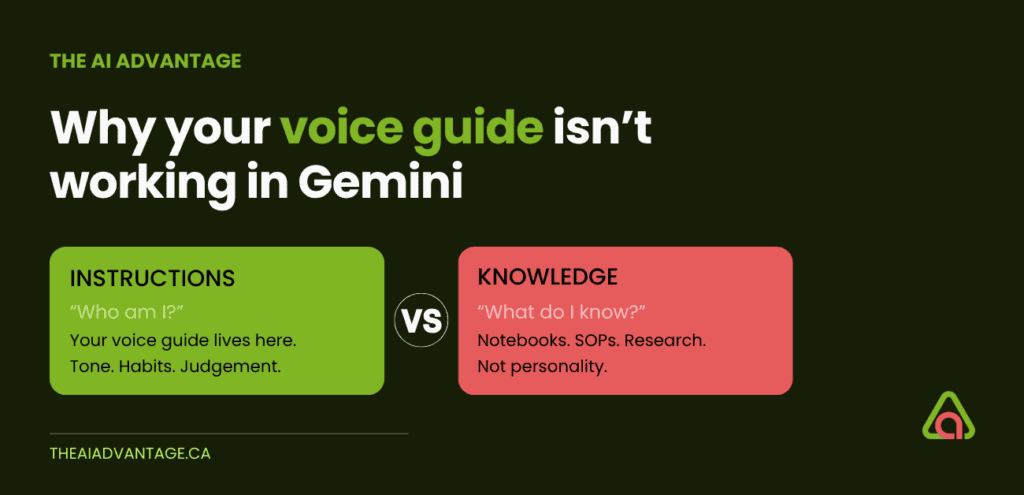
Here’s why: Instructions teach your Gem who it is. Knowledge teaches it what it knows.
That one distinction changes everything.
You Wrote a Great Voice Guide. So Why Does It Still Sound Like AI?
Maybe this sounds familiar.
You spent an hour documenting your writing style. You explained your tone, listed words you avoid, included examples of your writing, and carefully described how you communicate.
Then you uploaded that document into Gemini Notebook. You connected the Notebook to your Gem. You asked it to write, and it sounded like someone had studied your writing instead of becoming your writer.
That’s because Gemini Notebook isn’t trying to imitate you. It’s trying to understand you. Those are two very different jobs.
Think of Your AI Like a Small Team
The biggest shift in how I use Gemini came when I stopped looking for one “perfect” AI assistant.
Instead, I built a small team. Each member has a different job.
| Team Member | Tool | Primary Job |
| The Librarian | Gemini Notebook | Finds facts, summarizes documents, and answers questions from your files. |
| The Partner | Brainstorming Gem | Thinks with you, challenges ideas, and helps you work through problems. |
| The Producer | Drafting Gem | Creates emails, blog posts, and content that sounds like you. |
Once I started assigning work this way, everything became easier. I stopped expecting one tool to do everything well. Instead, I let each one specialize.
Meet the Team
The Librarian
The Librarian’s job is simple. Find the facts.
Use Gemini Notebook when you need to:
- Compare documents
- Summarize research
- Answer questions from your files
- Stay grounded in source material
If you upload your voice guide here, Gemini Notebook treats it like any other document.
It thinks:
“This file explains how Nancy writes.”
It does not think:
“I should write exactly like Nancy.”
That’s why Gemini Notebook is fantastic for research and disappointing as a ghostwriter.
If you haven’t set up your Notebook as an actual research hub yet, that’s a separate build — this post is about keeping it in its lane, not setting it up.
The Partner
Your Brainstorming Gem is where conversations happen.
This is the teammate that asks questions, explores ideas, and helps you think through messy problems.
Use it when you want to:
- Explore a new idea
- Challenge assumptions
- Develop a strategy
- Expand rough notes into something useful
The goal isn’t polished writing. The goal is better thinking.
The Producer
This is the teammate that actually writes.
Your Drafting Gem already knows your communication style because you’ve taught it who it is. Its job is to turn ideas into finished work.
I walked through building exactly this kind of Gem for email specifically — same instructions-vs-knowledge principle, just applied to Gmail.
Use it for:
- Emails
- Blog posts
- Client proposals
- Social media
- Documentation
This is where your voice guide belongs. Not because it’s reference material. Because it’s operating instructions.
Every Gem Has Two Jobs
Every Gem has two places where you give it information. Think of them as two separate containers.
Instructions answer one question: Who am I?
This is where your voice guide belongs.
Your instructions define things like:
- communication style
- tone
- writing habits
- decision-making approach
- perspective
- rules
These aren’t facts. They’re behaviors.
Knowledge answers one question: What do I know?
This is your reference library.
Store things like:
- Gemini Notebooks
- SOPs
- Research
- Product documentation
- Meeting notes
- Client information
Knowledge gives your Gem context. It doesn’t give it personality.
The Golden Rule
Instructions define the who.
Knowledge defines the what.
When those two are in the right place, Gemini knows both how to think and what information to use.
When they’re reversed, your writing starts sounding like a summary instead of a conversation.
There’s One More Piece
Most people think a voice guide is all about writing style.
Sentence length.
Word choice.
Formatting.
Tone.
Those things matter. But they’re only part of the picture.
Your best writing also reflects your opinions, your values, your teaching style, the assumptions you challenge, and how you solve problems.
That’s bigger than voice. That’s identity.
And I think that’s where many AI users get stuck.
We’ve been talking about voice guides when what we often need is a clearly defined persona.
I’ll unpack that in my next post.
FAQ
Where should my voice guide live?
Inside your Gem’s instructions. Not in Gemini Notebook. Not as a document in your knowledge base.
Can I brainstorm inside Gemini Notebook?
Not really. Notebook is designed to stay faithful to its sources. That’s exactly what makes it excellent for research and the wrong tool for creative thinking.
Did anything change when NotebookLM became Gemini Notebook?
The name changed. On July 16, 2026, Google renamed NotebookLM to Gemini Notebook. That’s it for your notebooks — nothing needs to move, no sources need recreating, and existing notebooks and shared links keep working through automatic redirects. What’s actually new is a “secure cloud computer” built into notebooks that can write and run code for deeper data analysis, plus a new blue-purple gradient logo rolling out across interfaces over the coming weeks. Notebooks are also starting to show up inside the main Gemini app for organizing chats and collecting work. None of that touches the lesson in this post.
Quick Win
If your Gem sounds like a polite, watered-down version of you, don’t start rewriting prompts.
First, check where your voice guide actually lives. If it’s sitting inside a Gemini Notebook, move it into your Gem’s instructions instead.
Keep your Notebooks for facts. Keep your instructions for identity.
One teaches your AI what to know. The other teaches it who’s talking.
That small change is often the difference between AI that sounds generic and AI that finally sounds like you.