
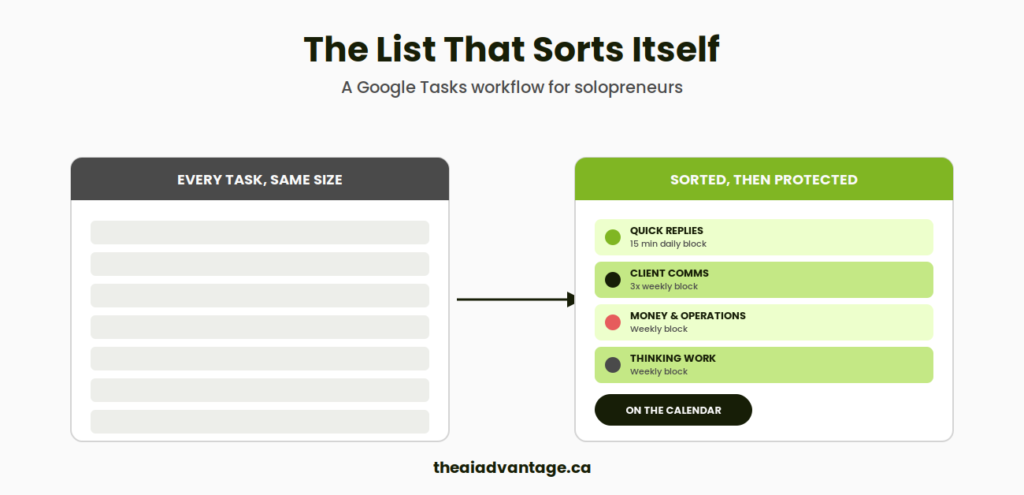
There’s a split second, right when I open my task list, where I brace for it.
Fifteen line items. All the same size. All in the same font. A reply to a client sitting next to an invoice, sitting next to an idea I blurted out at 11pm. None of it tells me which one actually matters right now. My brain has to do the sorting, every single time, all before I’ve done a single minute of real work.
It’s got decision fatigue written all over it. The kind that makes your eyes roll back in your head.
Here’s the system that fixed the noise.
TLDR
Every new task gets sorted by what kind of work it is. Time is protected and blocked off in Calendar for each kind. A form shortcut on my phone catches random thoughts, so nothing has to live in my head. Gemini helps me decide what to do first, so I’m never stuck. It lives inside Google Workspace Business Standard, so there’s nothing new to buy.
Why It Matters
Every task on that list feels like it’s demanding the same attention: deal with me now.
Answering that question forty times a day is a lot. It’s not so much the invoice that drains you. Or the client email. It’s the constant context switching and re-deciding, over and over, which one deserves your attention next. It’s the mental gymnastics before you’ve had a chance to do any real work.
It isn’t about a better to-do list. It’s about removing the re-deciding entirely.
Google Workspace makes it frictionless to manage your Tasks. It already lives inside Gmail, Calendar, Docs, Chat, Sheets, Slides, and Drive, so wherever you’re working in, it’s there. You can ask the Gemini App, Docs and Gmail to create tasks for you using your voice.
The System, Step by Step
Step 1: Sort by Kind, Not Urgency
Everything that lands on my lap falls into one of four kinds of work:
Quick replies. Anything under three minutes. Reply, archive, pay, schedule, delegate. Done the moment I touch it.
Client communication. Anything needing a response, proposal, follow-up, or update. This one matters because it’s the one clients actually feel.
Money and operations. Any invoices, receipts, contracts, CRM updates. This ensures the full automation I have setup behind the scenes is routinely monitored. Out of site shouldn’t mean out of mind.
Thinking work. Planning, decisions, offers, anything that needs a clear head and no interruptions.
Not fifteen unsorted line items. Four. And when something new comes in, it gets a Google Task sorted to one kind and stops competing with everything else for my attention.
Step 2: Protect Time by Kind, in Calendar
If it lives on my calendar, it’s real. A task feels like a suggestion. But a block on my calendar feels like an appointment. Anything else that wants my time has to book around it.
Each kind of work gets a recurring block, with the finish line written right into the title. “Clear ten items.” “Send three replies.” Because I’ve learned a block with no visible finish line is just a way to procrastinate with the tab open longer.
Step 3: Catch Ideas Before You Lose Them, in Forms
My mind wanders all the time, and usually not in the direction of anything on my task list.
Pick up eggs. Book Gemma in at the vet. Follow up with Roisin about the shared folder. Start a “confessions of a DIY founder” series on LinkedIn. Four completely unrelated thoughts, all showing up in the same ten minutes, none of them related to what I was supposed to be doing.
One question on a form I answer with my voice is bookmarked on my phone’s home screen. It catches the ideas and messy thoughts that interrupt my focus the second they come to mind. Then Gemini takes over deciding what needs to happen, and what kind of work it is. The thought gets managed immediately, so my brain can let it go.
Step 4: Let Gemini Remove the First-Step Problem
Some tasks don’t stall because they’re hard. They stall because I don’t have the bandwidth to determine the next move.
That’s what the custom Gem is for. It takes any task I give it and hands me back the smallest possible next action. Staring at a task is its own kind of stuck. Having one small thing to do next isn’t. I use my voice for this too.
Common Mistakes to Avoid
Treating every task as equally urgent. This is the single problem this system exists to solve. If everything’s a priority, nothing is, and you’re back to bracing at the list.
Skipping the Forms capture point. If a stray thought has nowhere to go in the moment, it either gets lost or it rattles around in your head until you can deal with it. Neither is better than a ten-second form.
Building calendar blocks with no visible finish line. A block without a clear purpose and next step gets skipped the first time something more interesting shows up. A block with a specific finish line gets protected.
Asking Gemini for a full plan instead of one next step. The goal isn’t more thinking. It’s less. Ask for the smallest move, not the whole roadmap when you don’t have the time or bandwidth.
FAQ
Do I need a project management tool for this to work? No. Google Tasks, Calendar, and Forms already do everything this system needs. Nothing new to buy or learn from scratch.
What happens if I don’t finish a block? The block ends anyway. Whatever’s left waits for the next one. The point of the finish line isn’t perfection, it’s ensuring you don’t stay stuck in one task.
Does this replace my CRM or my invoicing system? No. This is about when and how you manage a task, not the tools handling client records or bookkeeping. Those keep doing their job underneath this system.
How is this different from just using Google Tasks the normal way? Google Tasks on its own still treats every item the same. This system adds the sorting and protects your time around it. This is the part that actually removes the decision fatigue.
What if a task doesn’t fit neatly into one of the four kinds? Pick the closest one and move on. The categories exist to stop overthinking, not to create a new place to get stuck.
Quick Win Summary
The noise wasn’t the number of tasks. It was treating every one of them the same. Sort by kind, protect your time, catch random thoughts before they’re lost, and let Gemini hand you the first step. This is how you make the most of your Google Workspace subscription.