
You know what makes me smile? When tech companies create something that feels like they’ve been reading my mind. Google Sheets’ pre-built tables? They’re exactly that kind of feature.
I’ve been helping solopreneurs organize their business data since 1997 (yes – before some of you were born), and here’s what I know for sure: zero percent of us started our businesses because we were excited about spreadsheet formulas. We’re coaches, consultants, creators – people who’d rather spend time in our zone of genius than fighting with pivot tables.
Templates Worth Talking About
Let’s be real – if you’re running a business, you’ve got spreadsheets. They’re tracking your finances, organizing your client data, managing your projects. And unless you speak fluent formula (you know who you are), those spreadsheets probably feel like they’re fighting you every step of the way.
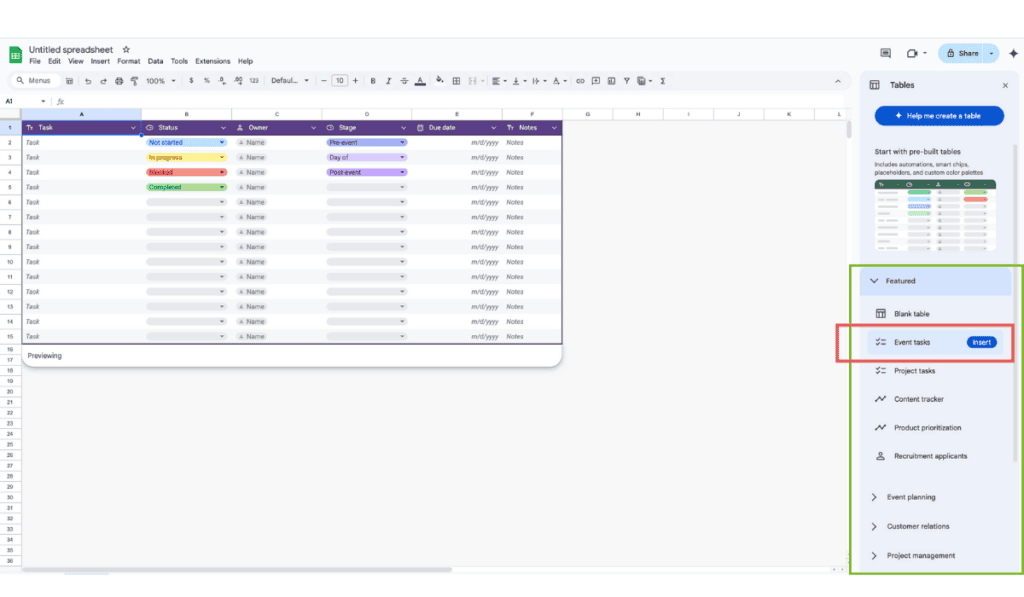
Google Sheets now comes with ready-to-use table templates that do all the heavy lifting for you. And with Gemini AI built right into Google Workspace (and free, by the way), you can even create custom tables from a single prompt.
The Reason I’m Smiling:
I’ve watched clients spend hours trying to create the “perfect” spreadsheet system, only to abandon it because it was too complicated to maintain. Or spend hours hunting for new tools while overlooking the powerhouse sitting right in their Google Workspace. (Pssst…. I’ve done it myself – too.) These pre-built tables offer structure, clarity, and efficiency and they’re a reminder to dig deeper into tools you’re already paying for.
No need to manually format cells, apply filters, and set up conditional formatting – just select (and insert) a table template that’s already optimized for your needs. 🎉
Why I love (and use) them:
- Reduced setup headache – Reduce spreadsheet setup by 50% with ready-made templates.
- Stop putting off organization – Move from scattered spreadsheets and copying between files to streamlined systems.
- Automate the boring stuff – Built-in dropdowns, smart chips, and formulas handle tasks for you.
Let’s Take a Peak at What’s Available
The “I Just Need Something Simple” Option
The Blank Table template is exactly what it sounds like – clean, structured, but not overwhelming. Perfect for when you need organization without the bells and whistles.

For the Event Planners Among Us
If you’re running workshops (virtual or in-person), launching products, or managing client events – this template keeps all those moving pieces in check. Trust me, your future self will thank you for using this one.
- Workshops or webinars – Track planning, promotions, and execution.
- Product launches – Manage marketing, logistics, and follow-ups.
- Client meetings or networking events – Keep all action items organized.

Project Management Made Less Painful
Remember that time you tried to keep track of a complex project in your head? Yeah, me too. This template handles deadlines, ownership, and project phases without making you feel like you need a project management certification.

- Deadlines and milestones – Ensure timely progress.
- Task ownership – Assign responsibilities easily.
- Project phases – Keep all elements of a project organized in one place.
Content Creation Made Simple
If content creation feels like herding cats right now (multiple drafts, missed deadlines, scattered ideas), this template is about to become your new best friend. Perfect for solopreneurs managing blogs, videos, or social content – it keeps everything from publication dates to content ideas in one place. Plus, it makes collaborating with your team or freelancers feel like you’ve finally got your act together.

- Manage blog posts, videos, and social media schedules.
- Track publication dates and content ideas.
- Collaborate with freelancers and team members easily.
Your Product Roadmap – Minus the Overwhelm
Ever wake up at 3 AM remembering that brilliant feature idea a client mentioned last week? Or realize you’ve got a growing list of “we should add this” suggestions that live in notebooks, emails, and sticky notes? This template is your solution. It helps you capture and prioritize improvements based on what your business (and clients) actually need, not just what feels urgent in the moment.

Hiring Without the Headaches
Ready to grow your team but dreading the thought of tracking applications across endless email threads? Been there. This template helps you track candidates, schedule interviews, and store all those important details in one organized space. Perfect for solopreneurs who want to look professional in their hiring process without spending hours creating systems from scratch.

Why Pre-Formatted Structure is a Total Win
- Instant Organization – No need to tweak fonts, borders, or colors.
- Clear Data Management – Easy-to-read columns with logical formatting.
- Professional Look – Ready-to-use templates make your data look polished.
Pre-Configured Dropdowns: More Winning
- Standardization – Keeps data consistent and error-free.
- Faster Data Entry – No need to type manually, just select an option.
- Improved Decision-Making – Visual indicators (like color-coded statuses) help prioritize tasks.
I Saved The Best Till Last: Google Workspace Integration
Here’s where it gets really good. These pre-built tables don’t just organize your data – they talk to your other Google tools – and make collaboration a breeze.
- Contacts → Add teammates directly to your project tracker. Just type their name, and Google Contacts pulls them in. No more copying and pasting email addresses!
- Calendar → Set task deadlines, and they’ll automatically sync with your Google Calendar. Stay on top of projects without manually adding reminders.
- Drive → Need to reference a document? Link client files, invoices, or project docs right inside your table. Everything stays in one place.
- Forms → Need to collect responses? Google Forms can feed directly into your tables, making surveys, job applications, or client feedback instantly accessible.
- Gemini AI → Ask Gemini to analyze trends, suggest formulas, or summarize data in plain English – no need to have a data analyst on speed dial.
“But What If None of These Fit Exactly What I Need?”
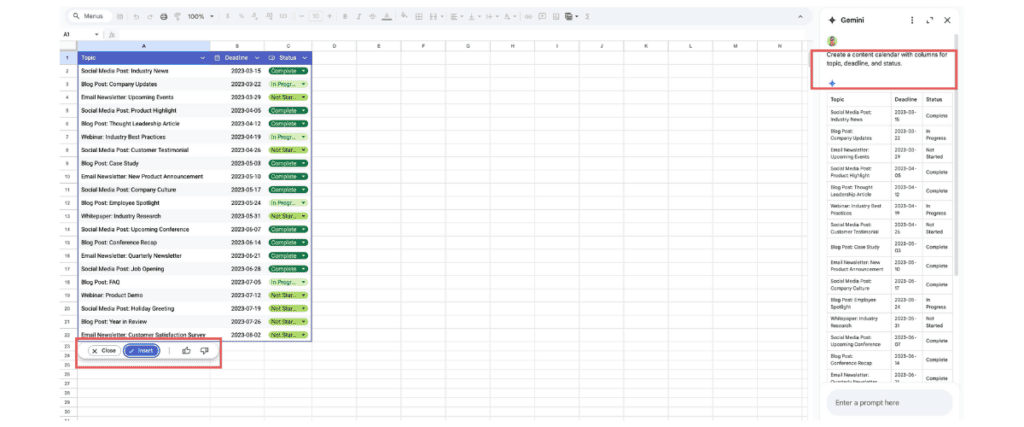
This is where Gemini AI shines. Just click “Help me create a table” in the side panel and tell it what you want.

Here’s a simple example: “Create a content calendar with columns for topic, deadline, and status.” Done! No fiddling with formats or formulas – just Click Insert!
Want to try making your own CRM – see: how to build a CRM with a single prompt.
Here’s What I Want You to Do Next
Open Google Sheets right now. Seriously, I’ll wait. Look for the templates and try the Gemini AI table generator. Start with something simple – maybe the content calendar or even easier – download my free CRM and customize it for your business. Give it a shot. I promise you’ll wonder why you ever did it the hard way.
Remember: Your business is built to make an impact, not to spend hours formatting spreadsheets. These tools? They’re here to get you back to the work that matters.
P.S. Got questions? Drop me a line – you know I love talking about this stuff! 🚀