Remember when we thought having multiple tabs open meant we were being productive? Those days are over.
Google’s Gemini, the whiz-kid AI assistant, just got a massive upgrade that’s about to change how you work – for the better. It’s like having a super-smart assistant who has memorized your entire digital office.
Effortless Information Retrieval
Picture this: You’re in Gemini, asking a question about last quarter’s report. Instead of opening another tab, digging through your Drive, or searching your email, Gemini does it all for you. It reads your documents, scans your emails, and gives you the answer – all without you lifting a finger. It’s like having a super-smart assistant who has memorized your entire digital office.
No More Copy-Paste Gymnastics. No More Tab-Hopping.
According to the International Data Corporation (IDC) and McKinsey Global Institute analysis:
- The average professional spends 28% of the workday reading and answering email.
- Nearly 20% is spent looking for internal information.
That’s almost half your day! But with Gemini Workspace Extensions, you’re about to get that time back.
What’s New?
Google Workspace extensions for Gmail, Google Drive, and Google Docs are now available in open beta for Gemini. This upgrade is available for Gemini Business, Enterprise, Education, and Education Premium add-ons. You can explore more at Gemini Google.
How To Turn On The Google Workspace Extension For Gemini
Before you set the extension, make sure you’re signed in to an administrator account, or ask your administrator for help. Here’s a quick guide to enable extensions:
Step 1:
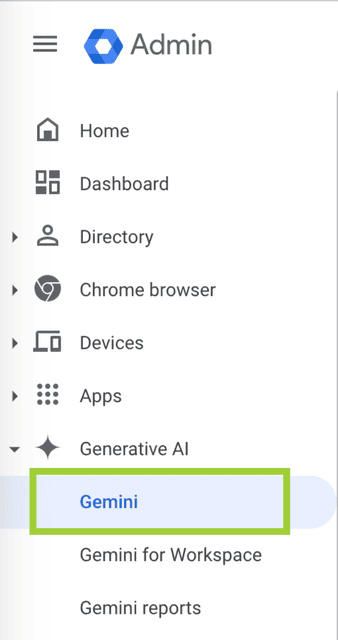
In the Admin console, go to Menu > Generative AI > Gemini.
Step 2:
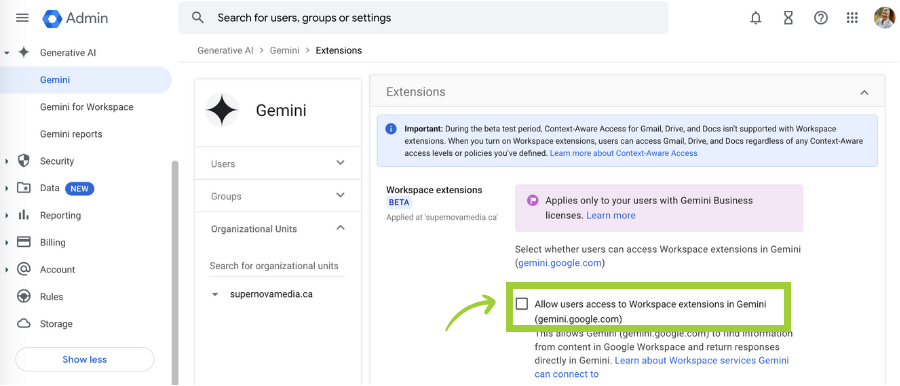
Scroll to “Extensions” and select “Allow users access to Workspace extensions in Gemini.”
Step 3:
Back in the Gemini app, you’ll need to turn on extensions here too. You can disable them at any time. Click Connect.
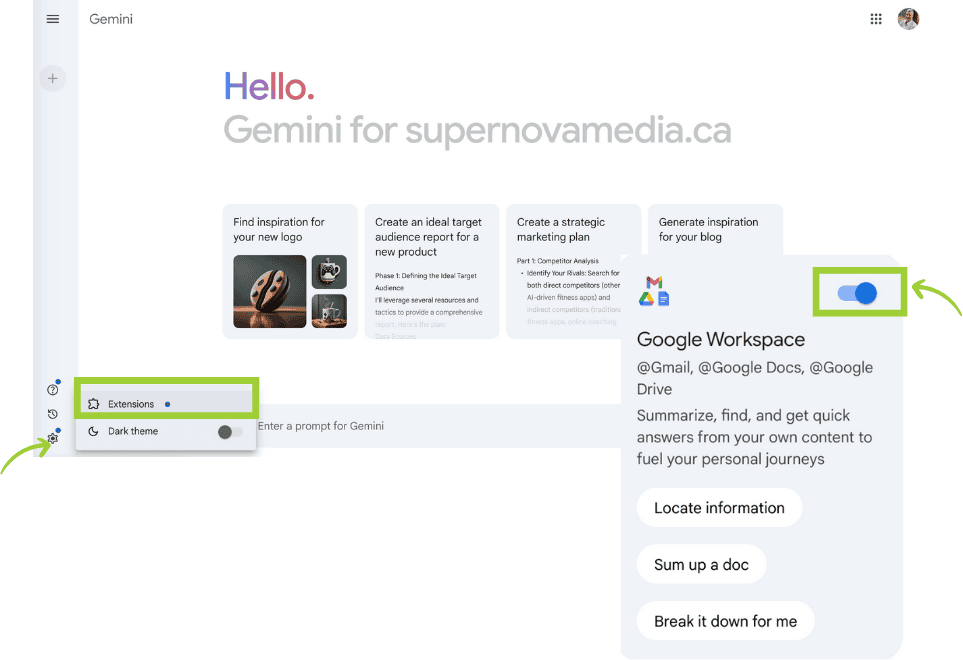
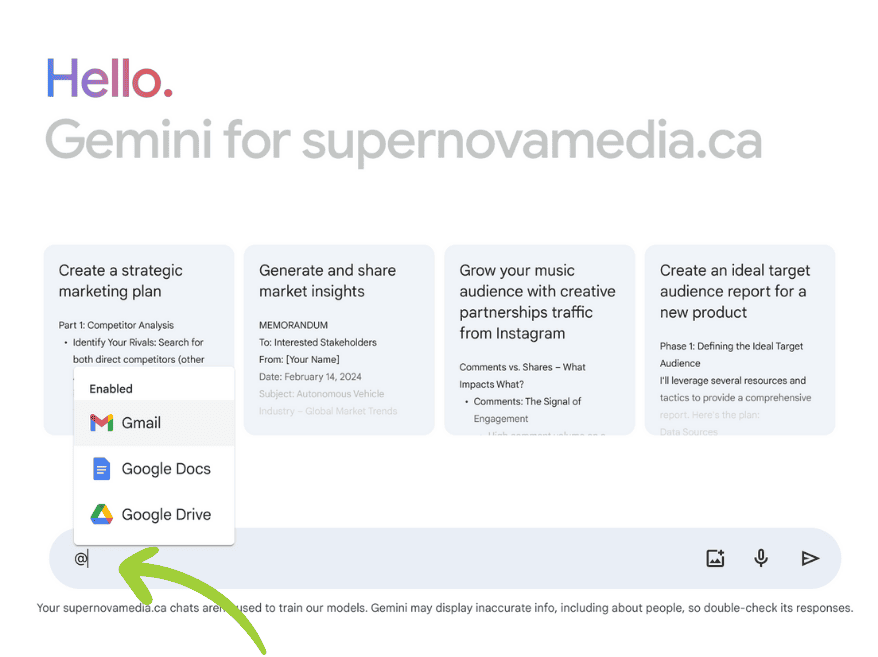
Start Your Chat
Type “@” in the text bar, and the drop-down will automatically appear for the user to select.
Important Note
To turn on Workspace extensions, Docs, Drive, and Gmail must all be turned on. Note that during the open beta period, the Context-Aware Access (CAA) feature will not be applicable. CAA is a security feature in Google Workspace that allows administrators to set rules about who can access certain apps and data based on specific conditions.
Extensions in Action
To use the extensions, tag your desired app with “@” in the text bar along with relevant keywords and action items for your request. For example:
- Example Prompt: “I need to prepare a client status report for my upcoming meeting with __. Please gather latest project documents from @Google Docs summarize the key points in recent emails in @Gmail and provide any insights on potential bottlenecks.”
- Response: Gemini references the necessary emails and docs without you needing to manually search.
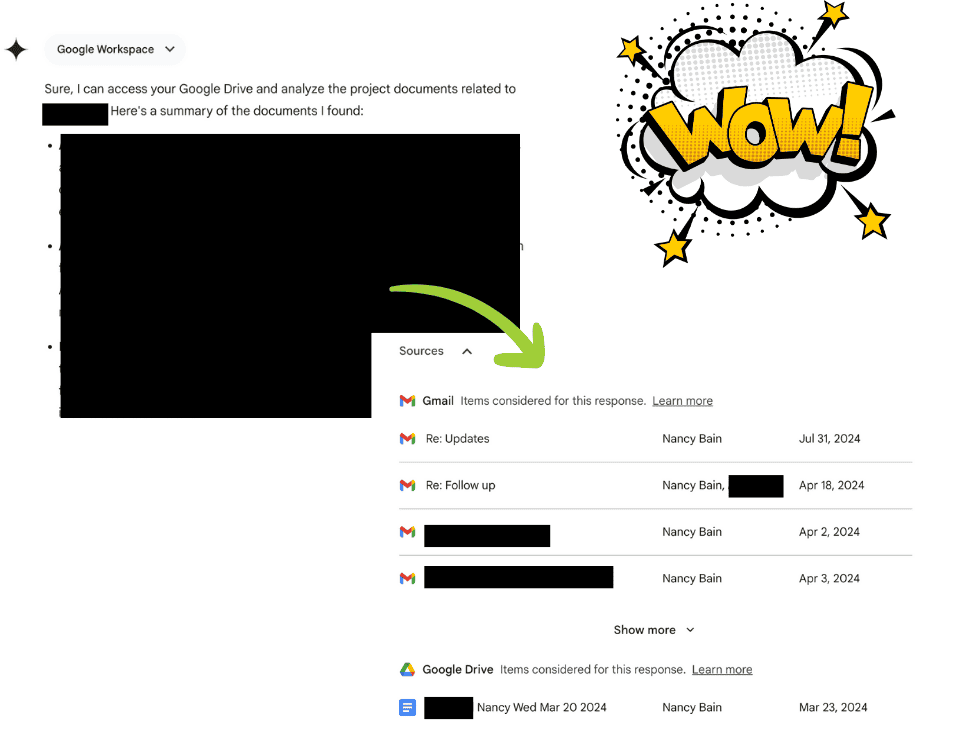
Key Features
- Working Across Apps: Gemini pulls info from all your Workspace apps simultaneously, so you get the complete picture.
- Searching Your Drive: It easily finds files in your Drive and understands their content.
- Understanding Emails: It reads and comprehends all your emails, even the unread ones.
- Contextual Answers: It provides answers that are relevant to your specific situation.
- Simplifying Your Workspace: It brings everything you need into one smart interface.
- Staying Up-to-Date: It automatically syncs with your Workspace, so you always have the latest info.
Reclaim Your Time
Say goodbye to the 48% of your workday wasted on emails and searching, and hello to focused, efficient workdays.
Conclusion: One Tab, Endless Possibilities
Key Takeaways:
- Seamless integration across Workspace apps.
- Intelligent context from emails and documents.
- Drastically reduced tab-switching and searching.
Your next steps:
- Activate Gemini Workspace Extensions today.
- Explore its capabilities in your daily tasks.
- Customize your workflow for maximum efficiency.
Want More? Subscribe to TechTactics
Every other Sunday, you’ll receive an email with:
- One ChatGPT lesson.
- Direct support via Slack.
- Notion Workspace Hub.
We’re not just sending newsletters. We’re building a community and a toolkit that grows with you.
By leveraging the new Gemini Workspace Extensions, you can transform your productivity and streamline your workflow like never before. Explore the possibilities and let AI advantage Consulting help you harness the power of custom AI solutions. Explore Our Services: AI Advantage Services